At Spatie we've recently introduced a bot to our Slack chat. We've named him Paolo (after the waiter in our favourite Italian restaurant in Antwerp: La Fontanella Da Enzo). Here's a demo of Paolo (the bot) in action.
Behind the scenes Paolo is powered by a Laravel application that responds to all requests Slack is sending to it. In this post I'd like to explain how you can set up your own Laravel powered Slack bot.
General flow
A message in slack that starts with a slash is called a slash command. Whenever you type in a slash command in Slack channel, an http request will be sent to your Laravel app. You have to respond to that command within 3 seconds. Failing to do some will result in an error being displayed in the channel.
After that initial response you're allowed to send multiple delayed responses. But there are some limitations for delayed responses. You may respond up to 5 times within 30 minutes after the user typed in the slash command on the slack channel. Want to know more about slash commands and how they work, then read this excellent article at Slack's API site.
To make responding to Slack a breeze we're going to used the package our team released a few days ago called spatie/laravel-slack-slash-command.
Setting things up
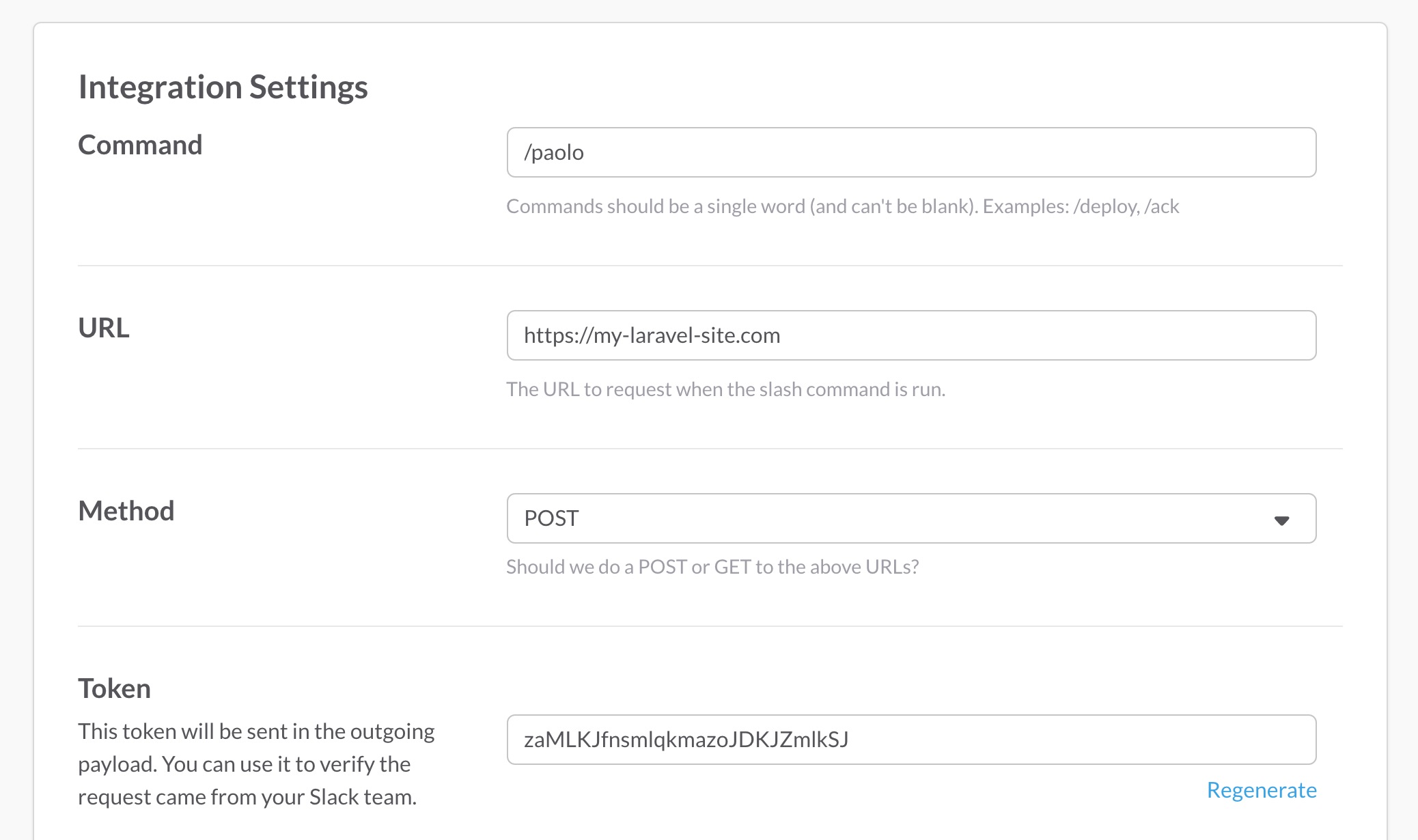
Before you can get started building our Laravel app, you'll need to set up slash command at Slack.com. Head over to the custom integrations page at Slack.com to get started. There click "Slash commands" and on the next page click "Add configuration". On that screen you can choose a name for your Slack command. In our examples we'll use paolo but you can choose anything that Slack allows.
You should now be on a screen that looks like this:
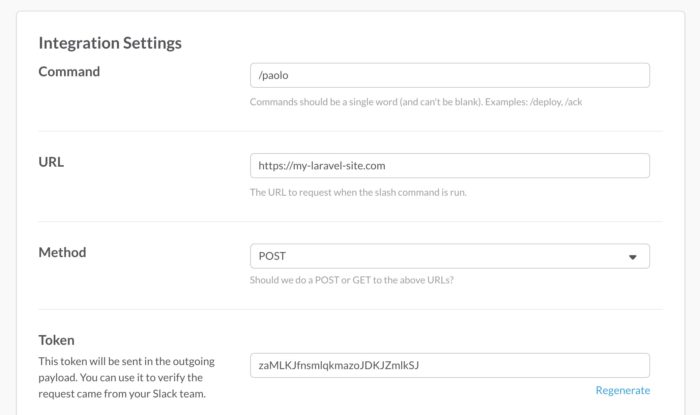
In the url field you should type the domain name of your Laravel app followed by one or more segments. In the screenshot we've added a slack segment. You can choose any segment you want. Normally the token field should already be filled. And that's all you need to do at Slack.com.
The next thing you'll need to do is to install the spatie/laravel-slack-slash-command package. Let's pull it in via Composer.
composer require spatie/laravel-slack-slash-command
Next, you must install the service provider:
// config/app.php
'providers' => [
    ...
    Spatie\SlashCommand\SlashCommandServiceProvider::class,
];
The configuration file of the package can be published with:
php artisan vendor:publish --provider="Spatie\SlashCommand\SlashCommandServiceProvider" --tag="config"
This is the contents of the published config file:
return [

    /**
     * Over at Slack you can configure to which url the slack commands must be send.
     * url here. You must specify that. Be sure to leave of the domain name.
     */
    'url' => 'slack',

    /**
     * The token generated by Slack with which to verify if a incoming slash command request is valid.
     */
    'token' => env('SLACK_SLASH_COMMAND_VERIFICATION_TOKEN'),

    /**
     * The handlers that will process the slash command. We'll call handlers from top to bottom
     * until the first one whose `canHandle` method returns true.
     */
    'handlers' => [
        //add your own handlers here


        //this handler will respond with a `Could not handle command` message.
        Spatie\SlashCommand\Handlers\CatchAll::class,
    ],
];
And with that you're ready to respond to http requests coming from Slack.
Setting up your first command handler
Whenever a user types in a slash command Slack will send an http request to the Laravel app. Next, our package will go over all classes in the handlers key of the config file from top to bottom until the first one whose canHandle method returns true. A handler is a class that is responsible for receiving a request from slack and sending a response back.
Let's create our first handler. Handlers must extend Spatie\SlashCommand\Handlers\BaseHandler and implement the two abstract methods from that BaseHandler: canHandle and Handle.
Here's an example.
namespace App\SlashCommandHandlers;

use Spatie\SlashCommand\Request;
use Spatie\SlashCommand\Response;
use Spatie\SlashCommand\Handlers\BaseHandler;

class Hodor extends BaseHandler
{
    /**
     * If this function returns true, the handle method will get called.
     *
     * @param \Spatie\SlashCommand\Request $request
     *
     * @return bool
     */
    public function canHandle(Request $request): bool
    {
        return true;
    }

    /**
     * Handle the given request.
     *
     * @param \Spatie\SlashCommand\Request $request
     *
     * @return \Spatie\SlashCommand\Response
     */
    public function handle(Request $request): Response
    {
        return $this->respondToSlack("Hodor, hodor...");
    }
}
This Hodor class will just respond with Hodor, hodor, ... to every request that is sent to it.
You'll need to register this class in the config file.
// app/config/laravel-slack-slash-command
    'handlers' => [
        App\SlashCommandHandlers\Hodor::class,
        ...
    ],
Let's see that in action.
A slightly more advanced handler
Let's create a slightly more interesting handler. This one that just repeats the command you've sent to it but only if the text after the command starts with repeat.
namespace App\SlashCommandHandlers;

use Spatie\SlashCommand\Request;
use Spatie\SlashCommand\Response;
use Spatie\SlashCommand\Handlers\BaseHandler;

class Repeat extends BaseHandler
{
    public function canHandle(Request $request): bool
    {
        return starts_with($request->text, 'repeat');
    }

    public function handle(Request $request): Response
    {
        $textWithoutRepeat = substr($request->text, 7)

        return $this->respondToSlack("You said {$textWithoutRepeat}");
    }
}
Let's register this handler as well.
// app/config/laravel-slack-slash-command

    'handlers' => [
        App\SlashCommandHandlers\Repeat::class,
        App\SlashCommandHandlers\Hodor::class,
        ...
    ],
If you type in /paolo repeat Hi, everybody in a slack channel now, you'll get a response Hi, everybody back. When you type in /poalo bla bla bla you'll get a response Hodor, hodor... because the Hodor handler is the first one which canHandle-method returns true.
Notice that Spatie\SlashCommand\Request being past in canHandle and handle? It contains all data that's being passed by Slack to our Laravel app. These are it's most important properties:
- `command`: the command name without the `/` that the user typed in. In our previous example this would be `paolo`.
- `text`: all text text after the command. In our the example above this would be `repeat Hi, everybody`.
- `userName`: the Slack username of the person that typed in the command
- `userId`: the Slack user id of the person that typed in the command
- `channelName`: the name of the channel where the user typed in the command
- `teamDomain`: the name of the Slack subdomain. So if your team is on `example.slack.com` this would be `example`.
Customizing your response
By default the response will be sent to the user who typed in the original message. If you want the response to be visible to all users in the channel you can do this:
    public function handle(Request $request): Response
    {
        return $this
           ->respondToSlack("Hodor, hodor...")
           ->displayResponseToEveryoneOnChannel();
    }
There are also many formatting options. Take a look at this response on Slack:
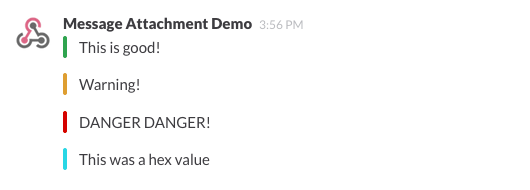
$this->respondToSlack()
    ->withAttachment(Attachment::create()
        ->setColor('good')
        ->setText('This is good!')
    )
    ->withAttachment(Attachment::create()
        ->setColor('warning')
        ->setText('Warning!')
    )
    ->withAttachment(Attachment::create()
        ->setColor('danger')
        ->setText('DANGER DANGER!')
    )
    ->withAttachment(Attachment::create()
        ->setColor('#439FE0')
        ->setText('This was a hex value')
    );
There are many more options to format a message. Take a look at Slacks documentation on attachments to learn what's possible.
Using signature handlers
A console command in Laravel can make use of a signature to set expectations on the input. A signature allows you to easily define arguments and options.
If you let your handler extend Spatie\SlashCommand\Handlers\SignatureHandler you can make use of a $signature and the getArgument and getOption methods to get the values of arguments and options.
Let's take a look at an example.
namespace App\SlashCommandHandlers;

use Spatie\SlashCommand\Request;
use Spatie\SlashCommand\Response;
use Spatie\SlashCommand\Handlers\SignatureHandler;

class SendEmail extends SignatureHandler
{
    public $signature = "paolo email:send {to} {message} {--queue}"

    public function handle(Request $request): Response
    {
        $to = $this->getArgument('to');

        $message = $this->getArgument('message');

        $queue = $this->getOption('queue') ?? 'default';

        //send email message...
    }
}
Notice that there is no canHandle method present in that class. The package will automatically determine that a command /paolo email:send test@email.com hello can be handled by this class.
Sending delayed responses
Remember that restriction mentioned above about the initial response to a slash command. Your Laravel app only has three seconds to respond otherwise an error message will be shown at Slack. After that initial fast response you're allowed to send 5 more responses in the next 30 minutes for the command. These responses are called "delayed responses". We're going to leverage Laravel's queued jobs to send those delayed responses. Please make sure that you've set up a real queue driver in your app, it needs to be something other than sync.
Imagine you need to call a slow API to get a response for a slash command. Let's first create a handler that will send the initial fast response.
namespace App\SlashCommandHandlers;

use Spatie\SlashCommand\Request;
use Spatie\SlashCommand\Response;

class SlowApi extends BaseHandler
{
    public function canHandle(Request $request): bool
    {
        return starts_with($request->text, 'give me the info');
    }

    public function handle(Request $request): Response
    {
        $this->dispatch(new SlowApiJob());

        return $this->respondToSlack("Looking that up for you...");
    }
}
Notice that we're dispatching a job right before sending a response. Behind the scenes Laravel will queue that job.
This is how that SlowApiJob would look like.
namespace App\SlashCommand\Jobs;

use Spatie\SlashCommand\Jobs\SlashCommandResponseJob;

class SlowApiJobJob extends SlashCommandResponseJob
{
    // notice here that Laravel will automatically inject dependencies here
    public function handle(MyApi $myApi)
    {
        $response = $myApi->fetchResponse();

        $this
           ->respondToSlack("Here is your response: {$response}")
           ->send();
    }
}
Notice that, unlike in the Handlers the response is not returned and that send() is called after the respondToSlack-method.
With this in place a quick response Looking that info for you... will be displayed right after the user typed /your-command get me the info. After a little while, when MyApi has done it's job Here is your response: ... will be sent to the channel.
Some useful handlers
The previous examples of this post were quite silly. You'll probably never going to use to handlers in your bot. Let's review a real life example. Our Poalo bot can lookup dns records for a given domain. This is how that looks like in a Slack channel.
This is the actual class that we use in our bot:
namespace App\SlashCommandHandlers;

use Spatie\SlashCommand\Attachment;
use Spatie\SlashCommand\AttachmentField;
use Spatie\SlashCommand\Handlers\SignatureHandler;
use Spatie\SlashCommand\Request;
use Spatie\SlashCommand\Response;

class Dns extends SignatureHandler
{
    protected $signature = 'paolo dns {domain}';

    /**
     * Handle the given request. Remember that Slack expects a response
     * within three seconds after the slash command was issued. If
     * there is more time needed, dispatch a job.
     *
     * @param Request $request
     *
     * @return Response
     */
    public function handle(Request $request): Response
    {
        $domain = $this->getArgument('domain');

        if (empty($domain)) {
            return $this->respondToSlack("You must provide a domain name.");
        }

        $sanitizedDomain = str_replace(['http://', 'https://'], '', strtolower($this->getArgument('domain')));

        $dnsRecords = dns_get_record($sanitizedDomain, DNS_ALL);

        if (!count($dnsRecords)) {
            return $this->respondToSlack("Could not get any dns records for domain {$domain}");
        }

        $attachmentFields = collect($dnsRecords)->reduce(function (array $attachmentFields, array $dnsRecord) {
            $value = $dnsRecord['ip'] ?? $dnsRecord['target'] ?? $dnsRecord['mname'] ?? $dnsRecord['txt'] ?? $dnsRecord['ipv6'] ?? '';

            $attachmentFields[] = AttachmentField::create('Type', $dnsRecord['type'])->displaySideBySide();
            $attachmentFields[] = AttachmentField::create('Value', $value)->displaySideBySide();

            return $attachmentFields;
        }, []);

        return $this->respondToSlack("Here are the dns records for domain {$domain}")
            ->withAttachment(Attachment::create()
                ->setColor('good')
                ->setFields($attachmentFields)
            );
    }
}
In order to get home every member of our team needs to bike a bit. That's why we've also created a command to display a rain forecast. This is what happens when /paolo rain is typed in our slack channels.
This is the class responsible for creating that response.
namespace App\SlashCommandHandlers;

use Spatie\SlashCommand\Attachment;
use Spatie\SlashCommand\Handlers\SignatureHandler;
use Spatie\SlashCommand\Request;
use Spatie\SlashCommand\Response;

class Rain extends SignatureHandler
{
    protected $signature = 'paolo rain';

    /**
     * Handle the given request. Remember that Slack expects a response
     * within three seconds after the slash command was issued. If
     * there is more time needed, dispatch a job.
     *
     * @param Request $request
     *
     * @return Response
     */
    public function handle(Request $request): Response
    {
        return $this
            ->respondToSlack("Here you go!")
            ->withAttachment(
                Attachment::create()->setImageUrl('http://api.buienradar.nl/image/1.0/radarmapbe?width=550')
            );
    }
}
In closing
The spatie/laravel-slack-slash-command package makes is it easy to let a Laravel app respond to a slash command from Slack. If you start using the package, let me know in the comments below what your bot can do. And if you like our package, take a look at this list of Laravel packages we've previously released to see if we've made something that can be of use to you.
Read more