Quickly inspect a return value using tap
If you want to quickly inspect a return value, you can use tap + logger without adding a variable! #laravel pic.twitter.com/TXA02BYlaC
— Sebastian De Deyne (@sebdedeyne) April 27, 2018
Read more [twitter.com]
Posts tagged with debugging
If you want to quickly inspect a return value, you can use tap + logger without adding a variable! #laravel pic.twitter.com/TXA02BYlaC
— Sebastian De Deyne (@sebdedeyne) April 27, 2018
Read more [twitter.com]
console.log isn't the only command that can help you debug JS. Yotam Kadis, Editor of AppsFlyer, shares 10 more ways.
For the past decade, one of my passions is front-end development (especially javascript). As a craftsman, I love learning new tools of the trade. In this story, I’m going to give you some awesome tips for debugging like a pro, using the good old console.
https://medium.com/appsflyer/10-tips-for-javascript-debugging-like-a-pro-with-console-7140027eb5f6
Join thousands of developers
Every two weeks, I share practical tips, tutorials, and behind-the-scenes insights from maintaining 300+ open source packages.
No spam. Unsubscribe anytime. You can also follow me on X.
There's some cool stuff in the new version of the Vue devtools. Guillame Chau, member of the Vue core team, made a nice overview of the improvements.
A big update was released to the Vue devtools just a few days ago. Let’s dive into the new features and improvements!
https://medium.com/the-vue-point/whats-new-in-vue-devtools-4-0-9361e75e05d0
The are more cool features on the way as well:
We also have a few things in the works, like a standalone Vue devtools app that will allow debugging any environment (not just Chrome and Firefox), a brand new Routing tab and an improved support for Set and Map types.
Let's talk a little bit about Symfony's dump function. It's part of their VarDumper component. The function can dump a variable to the screen or browser in a nicer format than PHP's native var_dump. In the recently released Symfony 3.4 and Symfony 4 the function got a nice little improvement that…
The @ChromeDevTools now let you copy an object directly to the clipboard, and it’ll automatically be converted to JSON ???? https://t.co/yBv3QjbmRc pic.twitter.com/Tb6LHRf5qz
— Joseph Silber (@joseph_silber) November 30, 2017
Read more [twitter.com]
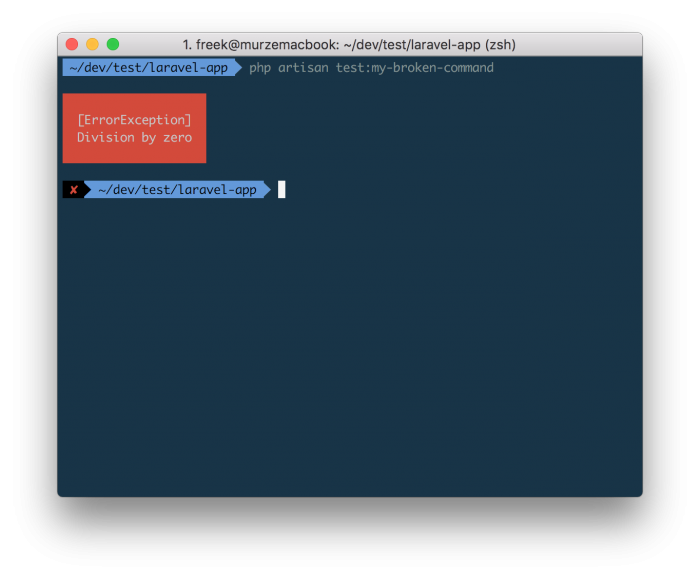
If you execute an Artisan command and something goes wrong, the error output is not terribly detailed.
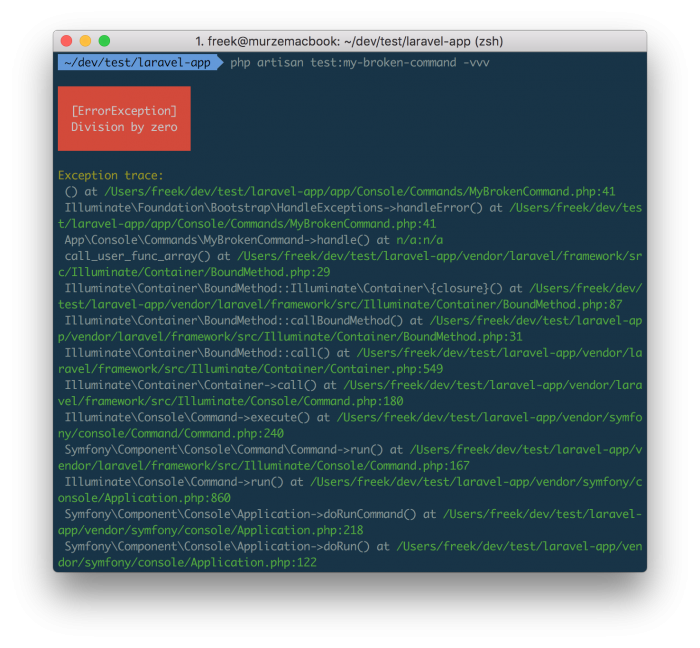
You can improve the output slightly by tagging on -vvv to make to output more verbose.
Now we already know the line that where the problem originates: there's something going wrong on line 41 of the MyBrokenCommand command.
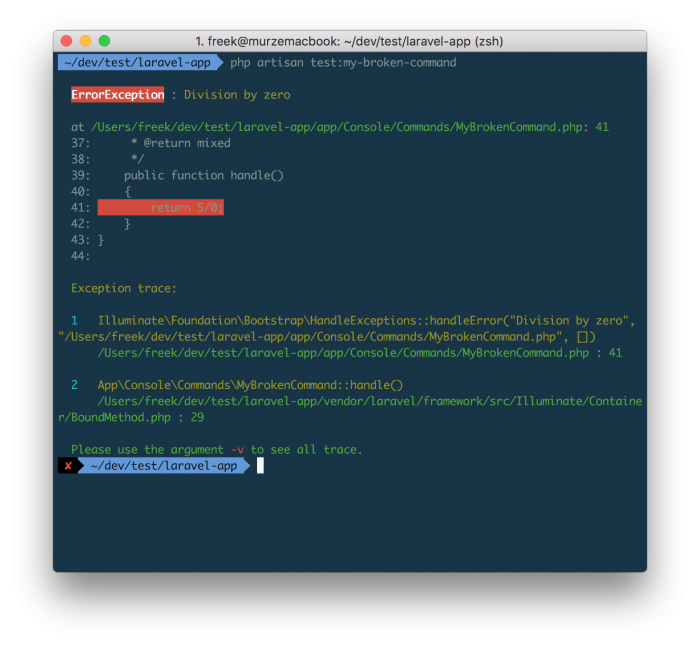
But we can improve the error output still. Nuno Maduro coded up a fantastic package called Collision that, once installed, provides much nicer output.
In this output we can immediately see what the silly programmer did wrong.
Let's hope that a future version of Laravel will be able to spit out these nicely formatted errors out of the box.
On his blog Mathias Bynens explains the differences under the hood between async/await and vanilla promises.
The fundamental difference between await and vanilla promises is that await X() suspends execution of the current function, while promise.then(X) continues execution of the current function after adding the X call to the callback chain. In the context of stack traces, this difference is pretty significant. ... Enable JavaScript engines to handle stack traces in a more performant and memory-efficient manner by following these recommendations:
- Prefer async/await over desugared promises.
- Use babel-preset-env to avoid transpiling async/await unnecessarily. ...
Vitaly Gordon explains how the little known comma operator makes it easy to add some debugging statements in short hand array functions.
What if you want to add a console.log call before x + 1 ? With comma operator, adding side-effects to functional expressions is simple:const fun = x => (console.log (x), x + 1)
https://medium.com/@xpl/javascript-did-you-know-about-the-comma-operator-ff9b511cc33
Laravel's tinker command allows to run any code you want as if you are inside your Laravel app. But if you want to run a single line of code if can be a bit bothersome. You must start up tinker, type the code, press enter, and quit tinker. Our new spatie/laravel-artisan-dd package contains an…
On the Tighten blog Keith Damiani wrote an article how you can mold the dd helper to your liking.
An important part of every Laravel developer's debugging arsenal is the humble dd() helper function—"dump and die"—to output the contents of a variable and terminate execution of your code. In the browser, dd() results in a structured, easy-to-read tree, complete with little arrow buttons that can be clicked to expand or hide children of nested structures. In the terminal, however, it's a different story. ... Fortunately, it's simple to build your very own customized version of dd() to help tame your unwieldly terminal output.
Daniel Reis shows some alternatives for the best known form of debugging JavaScript console.log.
I don’t consider myself a nitpicker. That’s only true, and it’s all fine and dandy… until I find a console.log() that someone forgot to remove from the JavaScript code. And if we’re talking about debugger statements… all hell breaks loose! ... I collected some of the most common examples I can present as proper alternatives for that process.
https://medium.com/outsystems-experts/beyond-console-debugging-tricks-f7d0d7f5df4
A couple of weeks ago I published a blog post on how you can easily debug collections using a dd macro. Meanwhile my company released a package that contains that macro. In this post I'd like to introduce a new dump macro, recently introduced in the package, that makes debugging collection chain…
Frank De Jonge, member of the PHP League and author/maintainer of Flysystem, was facing a world of pain with ElasticSearch. Luckily the story has an happy ending. Read all about his journey on his blog.
For a client project we are using ElasticSearch (ES) as one of our read-models. The use-case was pretty straight forward and the amount of data was super small. However, our problems were pretty big. It got to a point where we had to reboot our cluster periodically to prevent it from crashing. So, what was going on? Let's dig in.
https://blog.frankdejonge.nl/how-a-20mb-data-set-brought-down-a-14gb-elasticsearch-cluster/
Lately I've been working a lot with collections in Laravel. If you're not in the know: a collection is a sort of super charged array with a lot of powerful functions to transform the data inside it. The only thing I found a bit of a hassle is how to debug the various steps in a collection chain.…
Jeremy Kendall dissects bad PHP code on his site csiphp.com.
It all began with a new gig and an amazingly horrific codebase. I began tweeting the most unbelievable, most frustrating snippets I could find. After quite a few of those tweets, Chris Hartjes replied with, “Looking at your tweets I cannot even fathom what your job is. CSI:PHP?” A concept was born.http://csiphp.com/Twitter’s 140 characters are rarely enough to share the horrors of bad code, and I don’t want to give short shrift to the nefarious and misguided scripts that I’ve found. Behold the CSI: PHP blog, where I investigate criminally bad codebases and share the evidence with you, my fellow developers.
Mohamed Said created a package that saves all mails sent out by a Laravel application to html files on disk. This can be incredibly useful when designing and debugging mails. It's implemented as a Laravel mail driver. Once installed you'll only have to change your driver to preview.
Take a look at the package on GitHub.
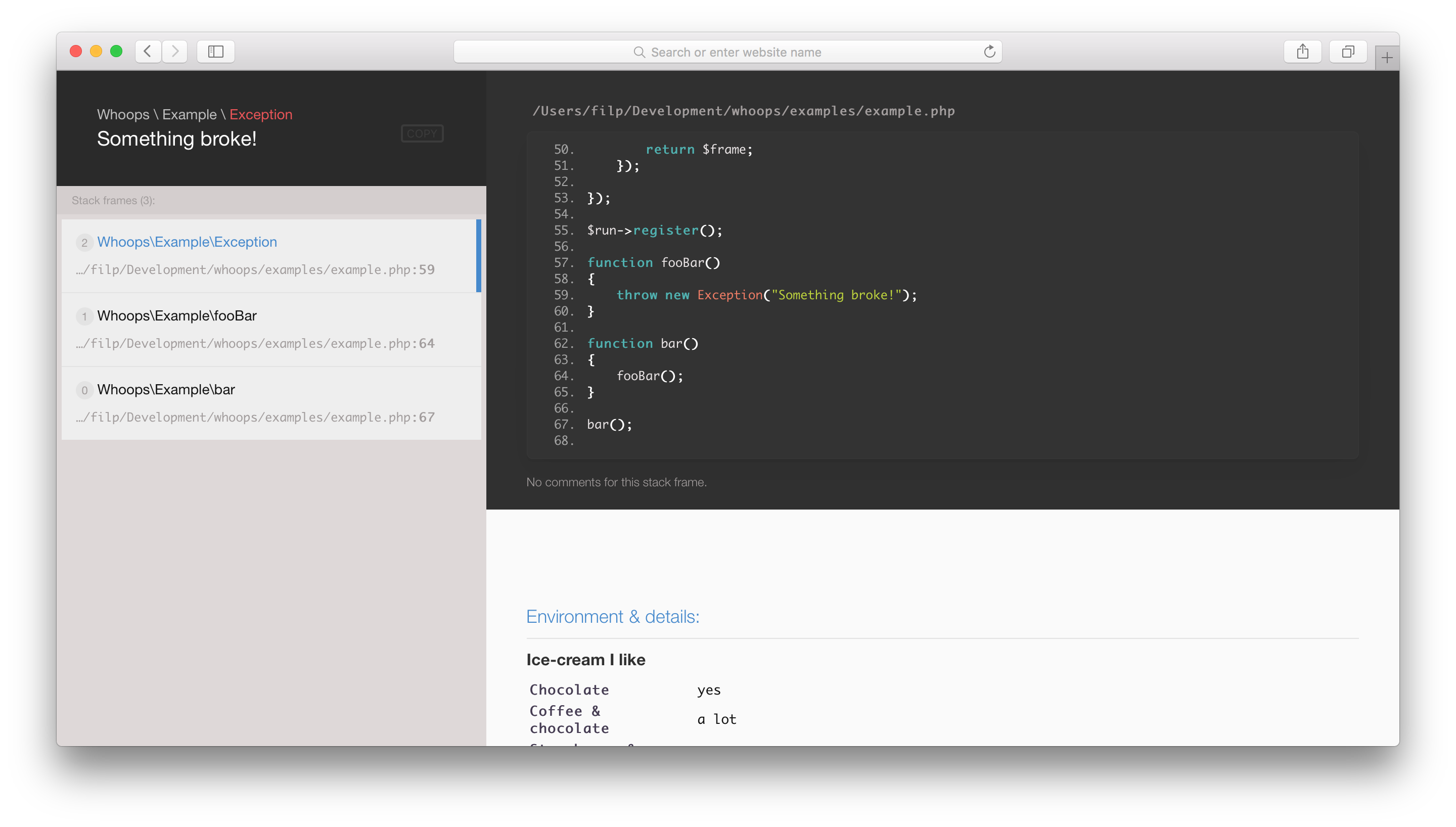
Whoops is an error handler framework for PHP. It's easy to integrate into a lot of frameworks, including Laravel 5. I prefer using Whoops over the default Laravel behaviour because Whoops displays the lines of code where the error/exception occurred. The maintainer Dennis Sokolov recently released a new major version which features a new beautiful design.
When working on JavaScript code you'll probably find yourself riddling the code with console.log-statements when something is not working the way that you're expecting.
But did you know that there is a debugger statement available? It has invokes any available debugging functionality. To put it otherwise: you can programmatically set a breakpoint for your debugger. It should work in any browser.
function potentiallyBuggyCode() {
debugger; //the debugger wil stop here
}
A great story by Derick Bailey of Watchmecode.net
The important lesson, ..., was that I owned up to the mistake, dug in and fixed it, and learned how to avoid the problem in the future. I was, in his mind, a better developer at the end of that day. I had survived a catastrophic crash of my own making and I had fixed the problem, learning some very valuable lessons in business down time and in code that day.http://derickbailey.com/email_archive/i-crashed-the-web-servers-of-a-100m-multi-national-corporation/