A visual guide to SSH tunnels
– robotmoon.com – Edit
This page explains use cases and examples of SSH tunnels while visually presenting the traffic flows.
Read more [robotmoon.com]
– robotmoon.com – Edit
This page explains use cases and examples of SSH tunnels while visually presenting the traffic flows.
Read more [robotmoon.com]
– michielkempen.com - submitted by Michiel Kempen – Edit
What is the TrustProxies middleware and how can it help you generate secure HTTPS URLs, even when running Laravel behind a proxy?
Read more [michielkempen.com]
Join 9,500+ smart developers
Get my monthly newsletter with what I learn from running Spatie, building Oh Dear, and maintaining 300+ open source packages. Practical takes on Laravel, PHP, and AI that you can actually use.
No spam. Unsubscribe anytime. You can also follow me on X.
"Freek publishes a super resourceful and practical newsletter. A must for anyone in the Laravel space"
Let's see what CORS is actually doing, and why it's actually our friend.
Read more [dev.to]
– laracasts.com – Edit
Jeffrey Way shares the strategies he uses to combat spam on the Laracasts forum.
Read more [laracasts.com]
by Freek Van der Herten – 2 minute read – Edit
For a project, I needed to make sure that a particular piece of data actually came from a specific source. There are already many packages that allow you to do this, but most are not fun or easy to use. That's why we created a new package called spatie/crypto to do this.
– ohdear.app – Edit
Earlier this year, Apple announced that it limit the lifetime of trusted certificates to 398 days. Shortly after, both Firefox and Chrome followed in their footsteps.
Read more [ohdear.app]
– Edit
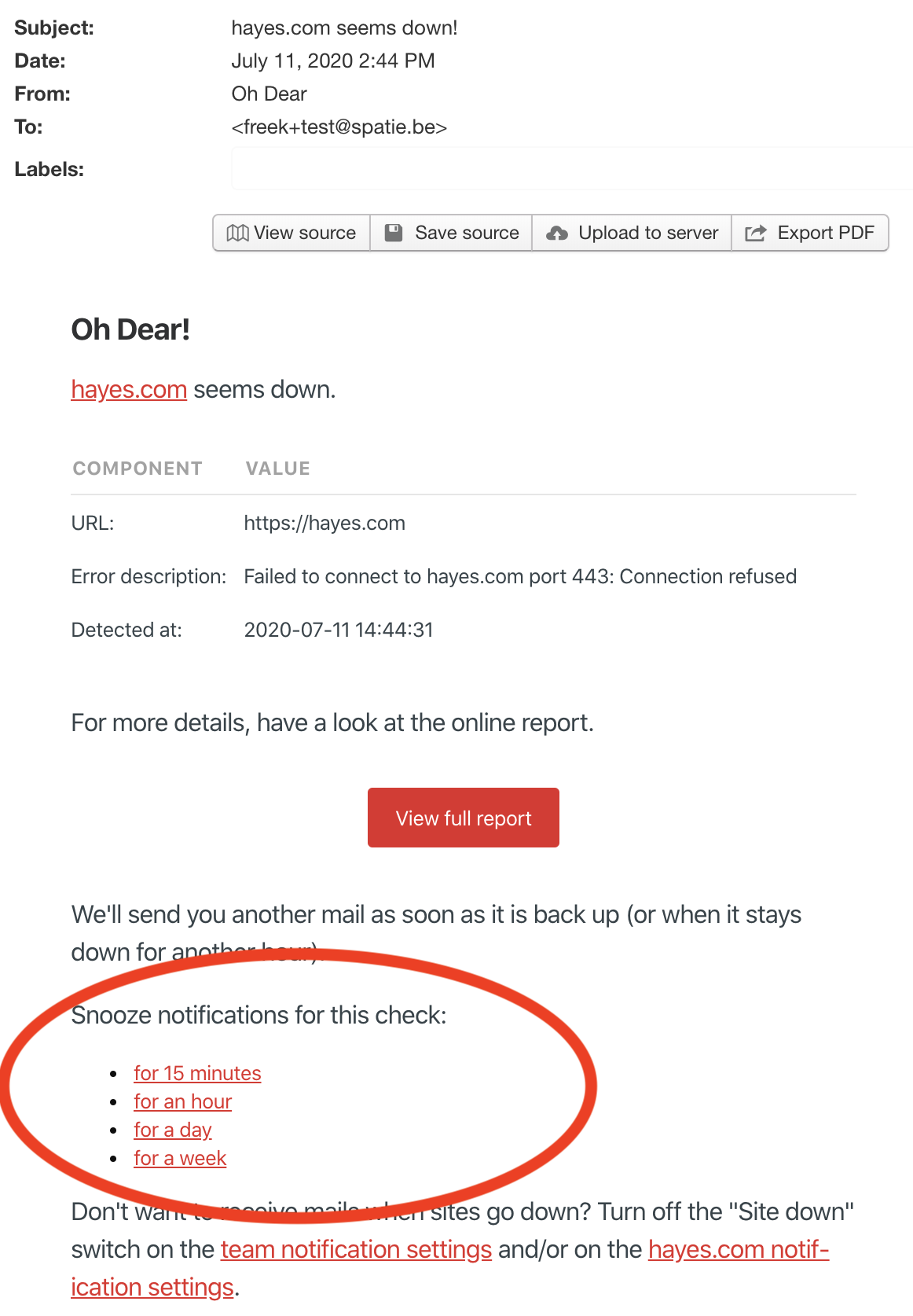
A few days ago, we improved the email notifications sent by Oh Dear. The email notifications now contain links that allow you to snooze further emails.
In this blog post, I'd like to explain why and how we added them.
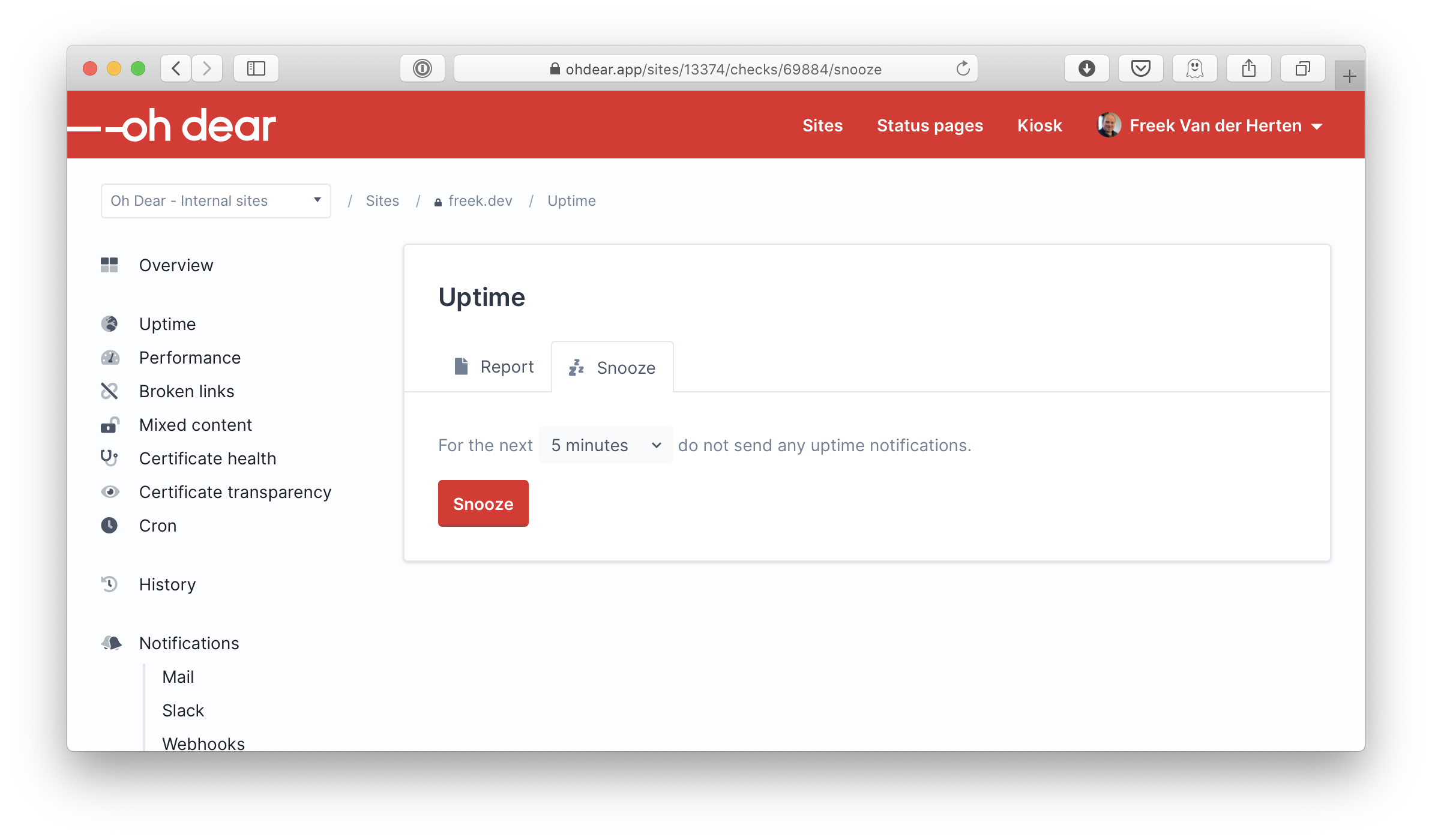
Earlier this year, we added the ability to snooze notifications to Oh Dear. Each different check in Oh Dear got a snooze setting screen. On that screen, users can choose how long we shouldn't send notifications for a check.
We also introduced advanced Slack notifications. Whenever you get a notification, you can snooze further notification using the little menu underneath a notification. This way, you can snooze a check without even having to visit the Oh Dear website. Handy!
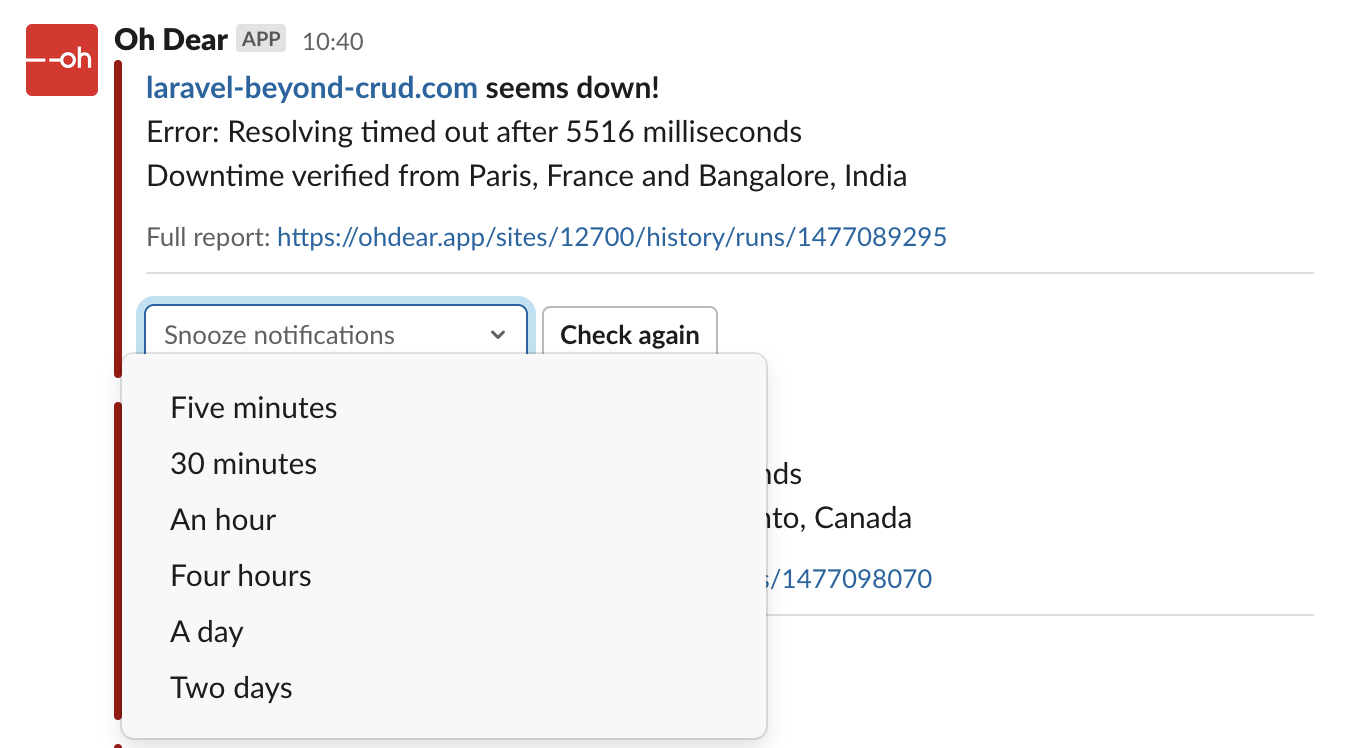
These advanced Slack got a lot of attention from us because we're using Slack notifications ourselves. But let's take a look at which notification channels are used the most at Oh Dear.
In the Oh Dear database, all notification preferences are stored in a table called notification_destinations. In the channel column, the name of the channel (mail, slack, nexmo), and so on is stored.
This query gives us the percentage for each different channel.
SELECT
   channel,
   ROUND(COUNT(channel) / (
            SELECT
            count(*)
            FROM notification_destinations) * 100) AS percentage
FROM
   notification_destinations
GROUP BY
   channel
ORDER BY
   percentage DESC
Here are the results.
mail: 82%slack: 13%nexmo: 2%pushover: 1%webhooks: 1%discord: 1%Even though our team relies on Slack notifications, the vast majority of Oh Dear subscribers use mail. It's easy to understand why: everybody already has an email address, and most people check their email regularly.
Because emails are being used so much for sending notifications, we decided to give them a little love by adding snooze links. Here's how such links look like.
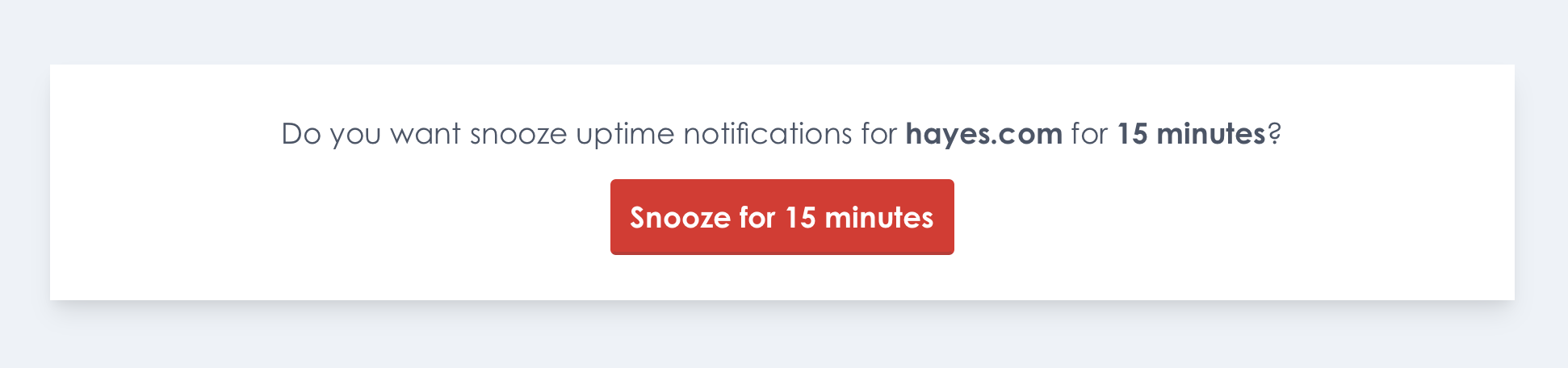
Some email client visit each link an email to preload content. That's why we don't snooze immediately after clicking the link in the mail, but show a confirmation dialog first.
This is how it looks like when you click a link.
 .
.
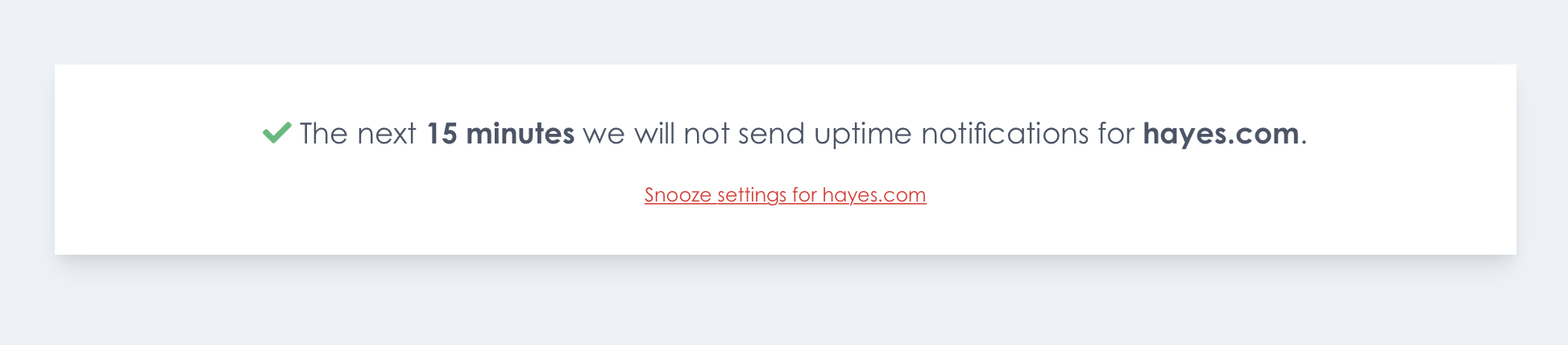
After clicking the button, notifications will be snoozed.
An important thing to note is that you don't have to be logged in for these links to work. These links have a signature has appended. Oh Dear uses this signature to verify the link hasn't been tampered with.
As you might suspect, Oh Dear is built using the Laravel framework. Laravel has baked in support for signed URLs.
Oh Dear offers multiple types of checks: uptime, certificate health, broken links, mixed content, ... Each check that we need to perform on a site, is stored a row in the checks table of the DB. In the Check model, we added this function to generate a URL to snooze a check.
// on the Check modelpublic function signedSnoozeUrl(int $minutes, string $email): string { return URL::temporarySignedRoute('signed.snooze', now()->addMinutes(60), [ 'check' => $this, 'minutes' => $minutes, 'email' => urlencode($email), ]); }
We weren't comfortable with sending out links that would stay valid forever. All of the signed URLs we generate are only valid for 60 minutes. The $minutes being passed to the function above represent the minutes how long notifications for this check should be snoozed. The email being passed is the email address to which the generated link will be sent. We'll use that value to log which email address snoozed a particular check.
Next, let's look at the notification itself. Laravel has excellent support for sending notifications, and we leverage that functionality in a big way.
Here's the toMail function in the UptimeCheckFailedNotification.
public function toMail(NotificationDestination $notifiable): MailMessage
{
    return (new MailMessage)
        ->from('alert@ohdear.app', 'Oh Dear')
        ->subject($this->getMainMessage())
        ->markdown('mail.uptime.uptimeCheckFailed', [
            'run' => $this->run,
            'check' => $this->run->check,
            'email' => $notifiable->routeNotificationForMail(),
        ]);
}
In Oh Dear, the notifiable of a notification isn't a user, but a NotificationDestination model. Using that model allows us to have a flexible notification system where single users and teams can define multiple notification destinations for several channels (mail, Slack, SMS, ...). I could write a length blogpost about our notification system itself, but I'm not going to deep diver into it for now.
Here's the code of that mail.uptime.uptimeCheckFailed view that notification uses.
@component('mail::message')
# Oh Dear!
[{{ $run->site()->label }}]({{ $run->site()->url }}) seems down.
@component('mail::table')
| Component     | Value   |
|:------------- |:------- |
| URL:     | {{ $run->site()->url }}      |
| Error description:   | {{ $run->checkerResult()->getErrorDescription() }}  |
| Detected at:   | {{ $run->ended_at->toTeamTimezone($run->site()->team) }}  |
@endcomponent
For more details, have a look at the online report.
@component('mail::button', ['url' => $run->result_url])
View full report
@endcomponent
We'll send you another mail as soon as it is back up (or when it stays down for another hour).
@include('mail.partials.snooze')
Don't want to receive mails when sites go down? Turn off the "Site down" switch on the [team notification settings]({{ route('team.notifications.mail') }}) and/or on the [{{ $run->site()->label }} notification settings]({{ route('site.notifications.mail', $run->site()->id) }}).
Thank you for using Oh Dear!
@endcomponent
You can see here that the snooze links itself are stored in a partial. We can easily use that partial in the email views of all the other notifications.
Here's the mail.partials.snooze view.
Snooze notifications for this check:
- [for 15 minutes]({{ $check->signedSnoozeUrl(15, $email) }})
- [for an hour]({{ $check->signedSnoozeUrl(60, $email) }})
- [for a day]({{ $check->signedSnoozeUrl(60 * 24, $email) }})
- [for a week]({{ $check->signedSnoozeUrl(60 * 24 * 7, $email) }})
Now that you know how those snooze URLs are built and sent, let's turn our attention to what happens when somebody clicks such a link in an email. In the routes file, we've set up these routes.
Route::middleware('signed')->prefix('/check/{check}/snooze/{minutes}/{email}')->group(function () {
    Route::get('/', [SnoozeCheckController::class, 'askConfirmation'])->name('signed.snooze');
    Route::post('/', [SnoozeCheckController::class, 'snooze']);
});
The get route is responsible for displaying the confirmation screen. In the post action the check will be snoozed.
That signed middleware is the one provided by Laravel. It will throw an exception when trying to visit the route with an invalid URL. More on the later.
Here's the SnoozeCheckController that handles the actual requests.
namespace App\Http\Front\Controllers\Check;use App\Domain\Check\Models\Check; use App\Domain\Notification\Actions\SnoozeCheckAction;
class SnoozeCheckController { public function askConfirmation(Check $check, int $minutes) { return view('front.snoozeCheck.askConfirmation', [ 'check' => $check, 'until' => $this->humanReadableTimeUntil($minutes), ]); }
<span class="hl-keyword">public</span> <span class="hl-keyword">function</span> <span class="hl-property">snooze</span>(<span class="hl-injection"><span class="hl-type">Check</span> $check, <span class="hl-type">int</span> $minutes, <span class="hl-type">string</span> $email</span>) { <span class="hl-variable">$until</span> = <span class="hl-property">now</span>()-><span class="hl-property">addMinutes</span>(<span class="hl-variable">$minutes</span>); (<span class="hl-keyword">new</span> <span class="hl-type">SnoozeCheckAction</span>())-><span class="hl-property">execute</span>(<span class="hl-variable">$check</span>, <span class="hl-variable">$until</span>, <span class="hl-variable">$email</span>); <span class="hl-keyword">return</span> <span class="hl-property">view</span>(<span class="hl-value">'front.snoozeCheck.snoozed'</span>, [ <span class="hl-value">'check'</span> => <span class="hl-variable">$check</span>, <span class="hl-value">'until'</span> => <span class="hl-variable">$this</span>-><span class="hl-property">humanReadableTimeUntil</span>(<span class="hl-variable">$minutes</span>), ]); } <span class="hl-keyword">protected</span> <span class="hl-keyword">function</span> <span class="hl-property">humanReadableTimeUntil</span>(<span class="hl-injection"><span class="hl-type">int</span> $minutes</span>): <span class="hl-type">string</span> { <span class="hl-keyword">return</span> <span class="hl-property">now</span>() -><span class="hl-property">addMinutes</span>(<span class="hl-variable">$minutes</span>) -><span class="hl-property">longAbsoluteDiffForHumans</span>(); }}
At the heart of this controller is SnoozeCheckAction in the snooze method, which does the actual work to snooze a check. This snoozing logic has been put in an action class so we can reuse it in other parts of our application (via our API, the controller that handles the UI of the snooze screen when logged in Oh Dear) where checks can be snoozed.
Action classes are a thing of beauty when you have logic that needs to be reused through an application. You can read more on action classes in this blog post. In the upcoming Laravel Beyond CRUD course, there will be an entire chapter dedicated to action classes.
That longAbsoluteDiffForHumans() function in the code snippet will be convenient to prepare a string to be displayed in the view. It will return one hour when you called it on a carbon instance with a value of one our in the future, 30 minutes when the value is 30 minutes in the future, and so on.
Here's the content of front.snoozeCheck.askConfirmation view.
<x-minimal-layout> <section class="bg-white text-gray-700 p-8 mt-8 sm:mt-16 text-center text-xl leading-relaxed shadow-lg"> <div class="mb-4"> Do you want snooze {{ strtolower($check->human_readable_check_type) }} notifications for <span class="font-bold">{{ $check->site->label }}</span> for <span class="font-bold">{{ $until }}</span>? </div><<span class="hl-keyword">form</span> <span class="hl-property">class</span>="form" <span class="hl-property">method</span>="POST"> @csrf <<span class="hl-keyword">button</span> <span class="hl-property">class</span>="button" <span class="hl-property">type</span>="submit">Snooze for {{ $until }}</<span class="hl-keyword">button</span>> </<span class="hl-keyword">form</span>> </<span class="hl-keyword">section</span>></x-minimal-layout>
When it's rendered, it will look something like this.
Our goal was to keep this confirmation screen very simple. We assume that when clicking a snooze link, you simply want to confirm this action and nothing else. This simple approach makes it very easy for people to snooze a check from their mobile device.
You can see in Blade view above that the confirmation form has no action. Because it has no action, the same signed URL will be used to send the POST request.
After clicking the button on the form, the check will be snoozed and this screen will be displayed.
Should a user want to see more details, the "Snooze settings" button can be clicked. This route is behind an auth check, so users will need to log in first.
You might have noticed that the askConfirmation Blade view uses a x-minimal-layout Blade component. You might have only used Blade components for small pieces of HTML, but they can be used for layouts as well.
Here's the content of the front.layouts.minimalLayout view which is the view that will be rendered when using the x-minimal-layout tag.
<html lang="en">
<head>
    <link rel="stylesheet" href="https://use.typekit.net/otv6pzl.css">
    <link rel="stylesheet" href="{{ mix('css/app.css') }}">
    <link rel="stylesheet" href="{{ url('assets/css/fontawesome.min.css') }}">
</head>
<body class="font-front">
<div class="min-h-screen flex flex-col p-10 bg-gray-200">
   {{ $slot }}
</div>
</body>
</html>
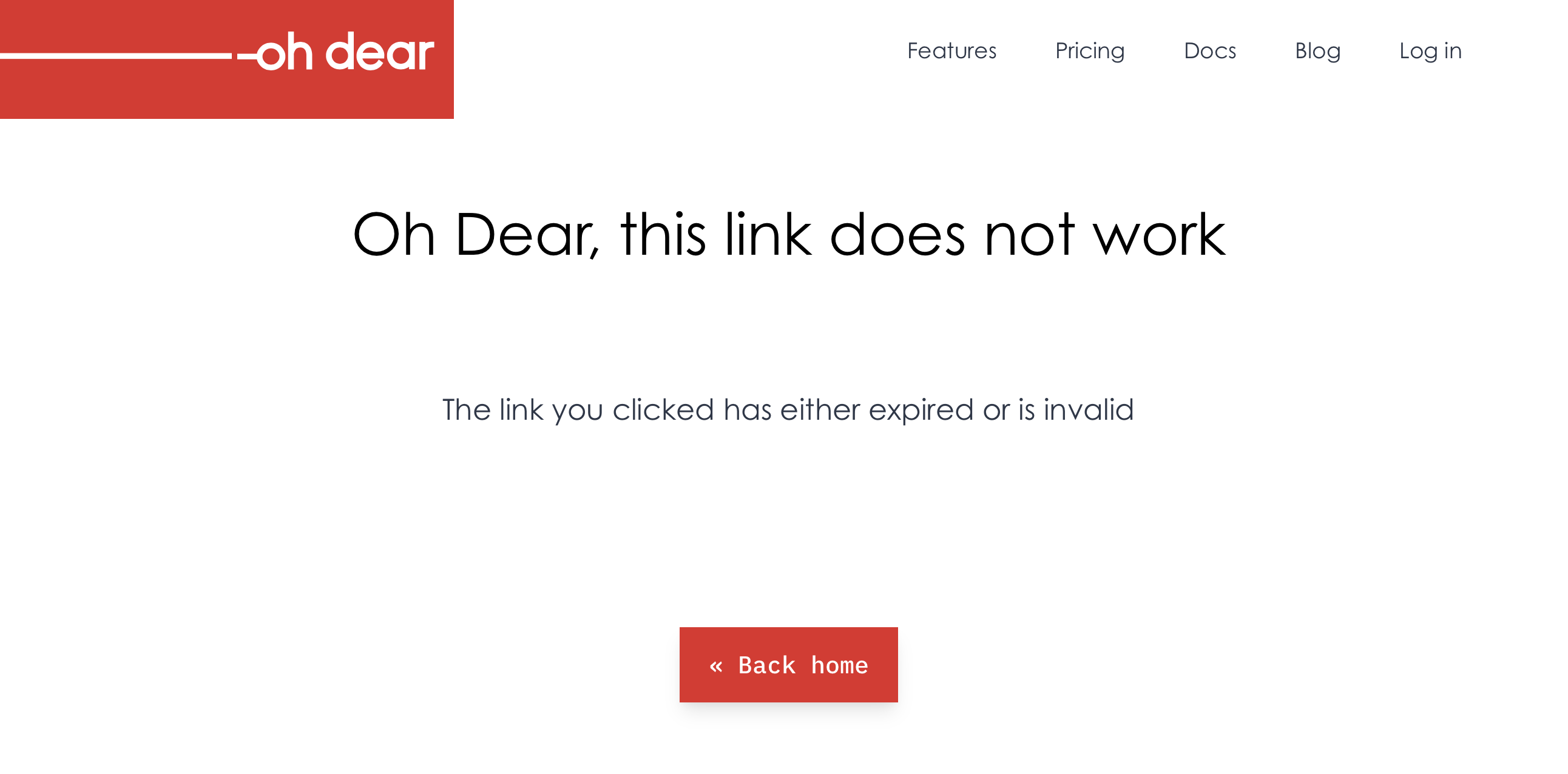
These signed URLs are valid for an hour only. When an expired link is clicked, Laravel will show a generic error screen. That's not very user friendly. It would be much better to display a screen that says the link is expired.
Luckily, this is easy to achieve. The signed middleware throws an Illuminate\Routing\Exceptions\InvalidSignatureException exception. In the exception handler, we can handle that particular exception and show a custom view.
// in app/Exceptions/Handler.phppublic function render($request, Throwable $exception) { if ($exception instanceof InvalidSignatureException) { return response()->view('errors.link-expired')->setStatusCode(Response::HTTP_FORBIDDEN); }
<span class="hl-keyword">return</span> <span class="hl-keyword">parent</span>::<span class="hl-property">render</span>(<span class="hl-variable">$request</span>, <span class="hl-variable">$exception</span>);}
If you don't want any entries in your log, in Flare, or any error tracker of your liking, you should add InvalidSignatureException to the $dontReport array in the exception handler.
protected $dontReport = [
    AuthenticationException::class,
    AuthorizationException::class,
    HttpException::class,
    ModelNotFoundException::class,
    // ...
    InvalidSignatureException::class,
];
In Oh Dear, nearly every piece of functionality is covered by tests. The snooze links are no exception. My favorite tests are ones where we check that behavior is correct. Those tests don't care about how a feature is implemented. Most of the time, they don't reach into the database or check the app's internal state. Instead, we check if the app behaves correctly.
In the first test, we will generate a signed URL to snooze a check for an hour. We're going to visit the URL using a POST request and assert that the check is snoozed. We're going to assert that one second before the hour is over, the check is still snoozed. One second later, the check isn't snoozed anymore.
public function setUp(): void
{
    parent::setUp();
$this->check = factory(Check::class)->create([
    'type' => CheckType::UPTIME,
]);

}
/** @test */
public function it_can_snooze_a_check_for_an_hour_using_a_signed_url()
{
TestTime::freeze();
$signedSnoozeCheckUrl = $this->check->signedSnoozeUrl(60, 'test@example.com');

$this->post($signedSnoozeCheckUrl)->assertSuccessful();

$this->assertTrue($this->check->isSnoozed());

TestTime::addMinutes(60)->subSecond();
$this->assertTrue($this->check->isSnoozed());

TestTime::addSecond();
$this->assertFalse($this->check->isSnoozed());

}
The TestTime class is provided by the spatie/test-time.
In the test above, we use the isSnoozed function to determine if the check is snoozed. We don't have to write a test for that function, as it is already covered by a couple of dedicated tests for the snooze functionality.
In a second test, we're going to make sure that we display the right snooze time to the user.
/** @test */ public function it_displays_the_right_time_span() { $signedSnoozeCheckUrl = $this->check->signedSnoozeUrl(60, 'test@example.com'); $this->get($signedSnoozeCheckUrl) ->assertSuccessful() ->assertSee('snoozed for 1 hour');<span class="hl-variable">$signedSnoozeCheckUrl</span> = <span class="hl-variable">$this</span>-><span class="hl-property">check</span>-><span class="hl-property">signedSnoozeUrl</span>(30, <span class="hl-value">'test@example.com'</span>); <span class="hl-variable">$this</span>-><span class="hl-property">get</span>(<span class="hl-variable">$signedSnoozeCheckUrl</span>) -><span class="hl-property">assertSuccessful</span>() -><span class="hl-property">assertSee</span>(<span class="hl-value">'snoozed for 30 minutes'</span>);}
In a final test, we're going to make sure that the URL can't be tampered with.
/** @test */ public function it_will_not_snooze_a_check_if_the_url_is_tampered_with() { /** @test */ public function it_will_not_snooze_a_check_if_the_url_is_tampered_with() { $signedSnoozeCheckUrl = $this->check->signedSnoozeUrl(60, 'test@example.com') . 'make-url-invalid';<span class="hl-variable">$this</span>-><span class="hl-property">get</span>(<span class="hl-variable">$signedSnoozeCheckUrl</span>)-><span class="hl-property">assertStatus</span>(<span class="hl-type">Response</span>::<span class="hl-property">HTTP_FORBIDDEN</span>); <span class="hl-variable">$this</span>-><span class="hl-property">post</span>(<span class="hl-variable">$signedSnoozeCheckUrl</span>)-><span class="hl-property">assertStatus</span>(<span class="hl-type">Response</span>::<span class="hl-property">HTTP_FORBIDDEN</span>); <span class="hl-variable">$this</span>-><span class="hl-property">assertFalse</span>(<span class="hl-variable">$this</span>-><span class="hl-property">check</span>-><span class="hl-property">isSnoozed</span>()); }}
You could argue that the test above isn't needed because we're not responsible for testing the framework code. But for security related things, we're rather safe than sorry. This test proves that we're using the functionality that Laravel offers correctly. For example, should we forget to apply the signed middleware to our routes, this test will fail.
I hope you enjoyed this little tour on why and how we implementation action links for email notifications. If you want to see it in action, consider registering at Oh Dear. There's a free trial period of 10 days.
A nice explanation of the window.crypto functions that are available in all major browsers.
Read more [blog.excalidraw.com]
– Edit
Mohammed Said tweeted out a couple of very interesting videos on some of Laravel's security related features.
– ohdear.app – Edit
On the Oh Dear blog, Mattias Geniar shares how he found all certificates that were affected by Let's Encrypt mass revocation of SSL certificates.
Read more [ohdear.app]
– hiddedevries.nl – Edit
Here's how to let password managers recognise your login form and let you use their features on your fields.
Read more [hiddedevries.nl]
Julia Evans explains how parties like Facebook can follow you around the web.
In this post we’ll experiment a bit and see exactly how Facebook can know what products you’ve looked at online! I’m using Facebook as an example in this blog post just because it’s easy to find websites with Facebook tracking pixels on them but of course almost every internet advertising company does this kind of tracking.
Read more [jvns.ca]
– ma.ttias.be – Edit
Mattias Geniar explains all the ways an IP address can be written.
Most of us write our IP addresses the way we've been taught, a long time ago: 127.0.0.1, 10.0.2.1, ... but that gets boring after a while, doesn't it. Luckily, there's a couple of ways to write an IP address, so you can mess with coworkers, clients or use it as a security measure to bypass certain (input) filters.
Read more [ma.ttias.be]
– www.nc-lp.com – Edit
Scary stuff.
US BlackHat 2018 proved that is possible to obtain RCE from a PHAR package, moreover, by tweaking its binary content, it's possible to disguise it as a full valid image, bypassing security checks.
Read more [www.nc-lp.com]
– simonkollross.de – Edit
Simon Kollross explains how to use our laravel-backup package to create an encrypted backup of your Laravel based app.
You should always encrypt backups of your apps and securely transfer them to one or multiple backup destinations. If you encrypt the backups on your server and transfer only the encrypted version, your backups are stored encrypted at rest in your backup destination. Not even your backup storage provider is able to read them.
Read more [simonkollross.de]
– ohdear.app – Edit
In a new post at the Oh Dear blog, there's a good explanation how HSTS improves security.
HSTS stands for HTTP Strict Transport Security. It's a mechanisme that allows a website to signal that it should only be reached via HTTPS - the encrypted HTTP - instead of the plain text HyperText Transfer Protocol.
Read more [ohdear.app]
– rawgit.com – Edit
Here's a PDF, made by Ryan Grove, that executes JavaScript when you open it in Chrome.
Read more [rawgit.com]
by Freek Van der Herten – 4 minute read – Edit
In a Laravel app policies are a great way to organize authorization logic that revolves around models.
For the longest time, I've been using Gate::before to allow superadmins to do anything they want. While working on a new app, it finally clicked how Gate::after can be useful too. I'd like to share that knowledge in this blog post.
– stitcher.io – Edit
My colleague Brent offers some more details on the intricacies of Laravel's query builder.
I recently learned that not all query builder functionality in Laravel is "safe". This means that user input shouldn't be passed directly to it, as it might expose your application to SQL injection vulnerabilities.
Read more [stitcher.io]
by Freek Van der Herten – 4 minute read – Edit
Our laravel-query-builder package exposed a serious security issue: it allowed SQL injection attacks. Laravel Query Builder v1.17.1, which is now available, fixes the vulnerability. If you're using the package, stop reading now and upgrade to the latest version first. For Laravel 5.6, 5.7 and 5.8…