Join 9,500+ smart developers

Get my monthly newsletter with what I learn from running Spatie, building Oh Dear, and maintaining 300+ open source packages. Practical takes on Laravel, PHP, and AI that you can actually use.

No spam. Unsubscribe anytime. You can also follow me on X.

Handling console signals in Laravel original

by Freek Van der Herten – 7 minute read

When you cancel a long-running artisan command with Ctrl+C, a SIGINT signal is sent by the operating system to the PHP process. You can use this signal to perform some cleanup quickly.

Symfony 5.2 introduced support for handling signals in commands.

We've released a package called spatie/laravel-signal-aware-commands that provides a substantial improvement to how you can use these signals in a Laravel app. In this blog post, I'd like to tell you all about it.

Read more

Laravel Tail can now tail remote logs original

by Freek Van der Herten – 2 minute read

laravel-tail is one of my favourite packages. When installed in a Laravel app it can be used to tail the log file. To tail a log file locally, you just have to issue this command: php artisan tail and it'll start tailing the latest log file (so it works for both daily and single log files). Any line…

Read more

10 Tips for Javascript Debugging Like a PRO with Console

console.log isn't the only command that can help you debug JS. Yotam Kadis, Editor of AppsFlyer, shares 10 more ways.

For the past decade, one of my passions is front-end development (especially javascript). As a craftsman, I love learning new tools of the trade. In this story, I’m going to give you some awesome tips for debugging like a pro, using the good old console.

https://medium.com/appsflyer/10-tips-for-javascript-debugging-like-a-pro-with-console-7140027eb5f6

Read more

Improve the error output of console commands in a Laravel app

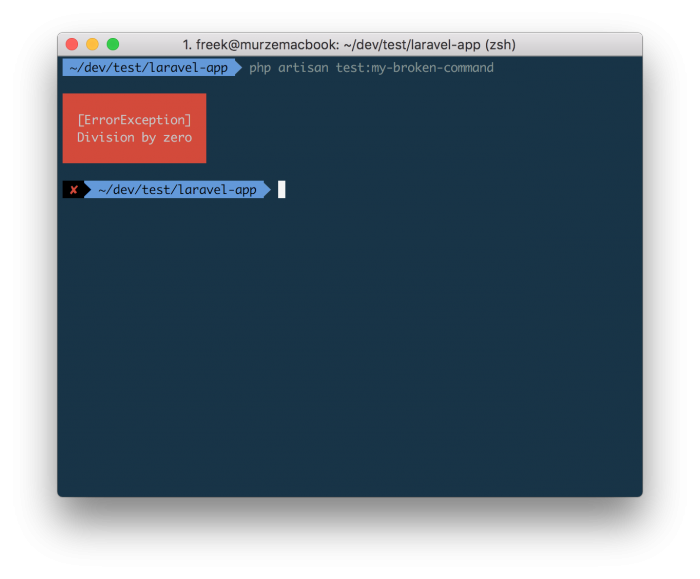
If you execute an Artisan command and something goes wrong, the error output is not terribly detailed.

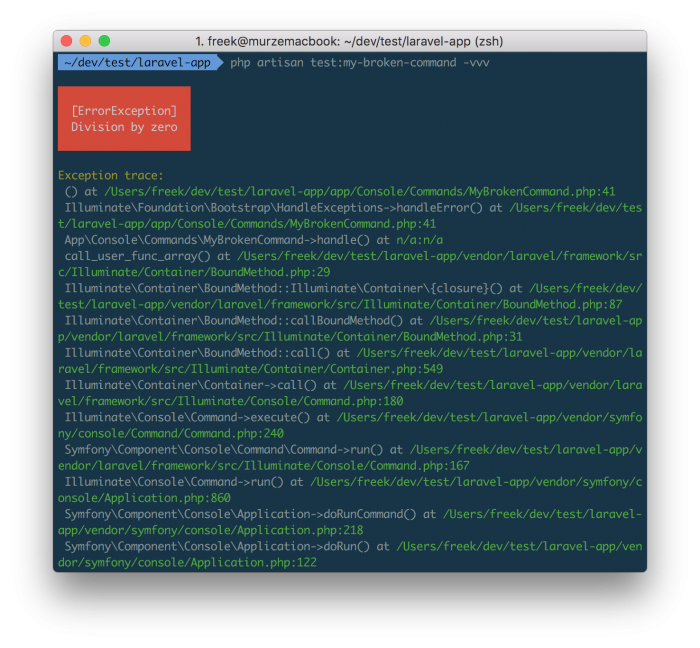
You can improve the output slightly by tagging on -vvv to make to output more verbose.

Now we already know the line that where the problem originates: there's something going wrong on line 41 of the MyBrokenCommand command.

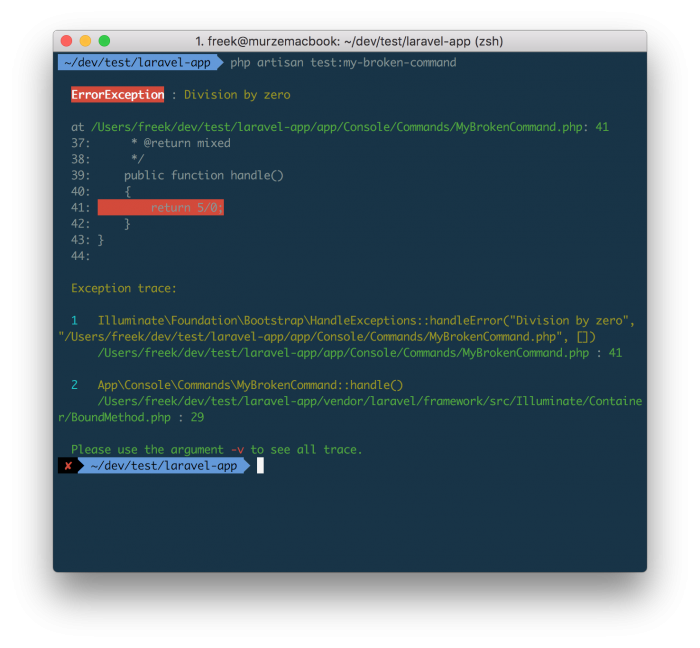
But we can improve the error output still. Nuno Maduro coded up a fantastic package called Collision that, once installed, provides much nicer output.

In this output we can immediately see what the silly programmer did wrong.

Let's hope that a future version of Laravel will be able to spit out these nicely formatted errors out of the box.

Read more

Creating a multiplayer snake game in PHP

On the sitepoint blog Bruno Skvorc explains some of the inner works of the PHP version of snake created by Andrew Carter.

At a recent conference in Bulgaria, there was a hackathon for which Andrew Carter created a PHP console version of the popular “snake” game.

I thought it was a really interesting concept, and since Andrew has a history of using PHP for weird things, I figured I’d demystify and explain how it was done.

https://www.sitepoint.com/howd-they-do-it-phpsnake-detecting-keypresses/

Read more

Beyond Console Debugging Tricks

Daniel Reis shows some alternatives for the best known form of debugging JavaScript console.log.

I don’t consider myself a nitpicker. That’s only true, and it’s all fine and dandy… until I find a console.log() that someone forgot to remove from the JavaScript code. And if we’re talking about debugger statements… all hell breaks loose! ... I collected some of the most common examples I can present as proper alternatives for that process.

https://medium.com/outsystems-experts/beyond-console-debugging-tricks-f7d0d7f5df4

Read more

A better way to style the output of console commands

When creating output from a Symfony based console command you might have created a title using code like this:

$output->writeln('');
$output->writeln('<info>Lorem Ipsum Dolor Sit Amet</>');
$output->writeln('<info>==========================</>');
$output->writeln('');

Starting from Symfony 2.7 there's a nice way to style the output of console commands. This code produces the same output as the example above

$io = new SymfonyStyle($input, $output)
$io->title('Lorem Ipsum Dolor Sit Amet');

There are styles for titles, sections, questions, tables, and so on. Take a look at the documention to learn what's possible.

Read more

Displaying stream progress in PHP

Hannes Van de Vreken has written a tutorial on how to display stream progress in PHP.

Opposite to HTTP requests, tasks run from the command line aren’t supposed to return instantly. They can take a very long time. Imagine a task that loops an entire database table or a task that references an external source repetitively, or maybe a taks that performs a large file transfer. It’s very important to show the issuer what is actually going on, or he/she will be left in the dark for minutes/hours. "Is this task still running?", "How long has this thing been running yet?", "Is it almost done?", "Is it running out of memory?"
https://hannesvdvreken.com/2015/05/12/stream-progress/

Read more