Posts tagged with development

ngrok, lvh.me and nip.io: A Trilogy for Local Development and Testing

nickjanetakis.com

Nick Janetakis shares three tools that come in handy when developing locally.

When developing real world applications you tend to run into certain road blocks such as:

  • How do I test webhooks locally?
  • How can I show a demo of my site to a client?
  • How can I develop a web app that uses subdomains on localhost?
  • How can I test Let’s Encrypt without a domain name? In this article, we’re going to cover all 4 use cases using 3 free tools and services.

Read more [nickjanetakis.com]

How to compile an unreleased PHP feature

www.sammyk.me

Sammy Kaye Powers, the host of the PHP Roundtable podcast, wrote a blogpost on how to compile PHP from source including unreleased RFC's. After following this tutorial you'll be able to play with the [typed properties] that are currently under discussion.

We'll be discovering and testing a completely unreleased feature of php-src from an RFC that's still under discussion. If you've ever wanted to be ahead of the curve of PHP features or you've just wanted to contribute back to PHP internals, testing an unreleased feature from an RFC is a fun and educational way to do so.

Read more [www.sammyk.me]

Join thousands of developers

Every two weeks, I share practical tips, tutorials, and behind-the-scenes insights from maintaining 300+ open source packages.

No spam. Unsubscribe anytime. You can also follow me on X.

A PHP debugger written in PHP

blog.krakjoe.ninja

Joe Watkins, core PHP developer and author of (amongst many other things) ptrheads, is busy creating a PHP debugger written in PHP that you can just composer require.

This isn't just pipe dreams, the PHP code exists, it's alpha quality and largely untested ...There is much to do and you shouldn't design your workflow around this (or any alpha quality software) yet. What you should do is start reading code, testing, and opening pull requests...

You'll find the code of Joe's debugger in this repo on GitHub.

Read more [blog.krakjoe.ninja]

Run a package from a local directory

Barry Van Veen shares how you can install a package from a local path into your project. This is extremely handy when developing a package because you can immediately toy with it in a full application.

This article explains how you can require a package from a local path into your project with Composer. This way you can run a local copy of a repository and test any changes you make. Because the local repo will be symlinked changes are shared in real-time, there is no need for intermediate committing and updating.

https://barryvanveen.nl/blog/44-package-development-run-a-package-from-a-local-directory

Read more

What's new in Vue Devtools 4.0

There's some cool stuff in the new version of the Vue devtools. Guillame Chau, member of the Vue core team, made a nice overview of the improvements.

A big update was released to the Vue devtools just a few days ago. Let’s dive into the new features and improvements!

https://medium.com/the-vue-point/whats-new-in-vue-devtools-4-0-9361e75e05d0

The are more cool features on the way as well:

We also have a few things in the works, like a standalone Vue devtools app that will allow debugging any environment (not just Chrome and Firefox), a brand new Routing tab and an improved support for Set and Map types.

Read more

Dockerize your Laravel app with Vessel

Chris Fidao has created an easy to handle, well documented, Docker dev environment for Laravel projects. It's an excellent starting point if you want to have a taste of what Docker can do.

For the introductory newsletter:

I like Vessel the best for the following reasons: 1. It's installed per-project instead of globally. This lets me customize it per project if need be. 2. Docker lets me change out versions of software such as Nginx, MySQL, Redis, and others very easily. (I've often needed to use an older MySQL version at work) 3. Docker lets me add extra software (perhaps Beanstalkd for queues, or PgSQL for database) really easily 4. Docker containers are more like processes than VMs. They generally only use what resources they need (with some caveats, but even with those, they're lighter than Vagrant virtual machines) 5. I can fill up my workstation with one technology (Docker!) instead of many (PHP, Redis, MySQL, etc) with all their configuration files and data strewn about all over my file system 6. You can expand on your dev workflow to build up to a production workflow using all the same technology (Docker!) - You can check out Shipping Docker for my full course on bringing Docker from dev into production.

https://vessel.shippingdocker.com

Read more

Packages that make developing Laravel apps easier

by Freek Van der Herten – 3 minute read

In this post I'd like to share some of the packages that make developing a Laravel app easier. laravel-debugbar This package really needs no introduction as it is one of the most popular packages around. It's made by Barry Vd. Heuvel and it's a real powerhouse. Once the package is installed it…

Read more

Switching PHP versions with Laravel Valet

Michael Dyrynda, one of the two new hosts of the Laravel Podcast, share a nice tip on how to quickly switch PHP versions when using Laravel Valet.

At the time of writing, Laravel Valet ships with PHP 7.1 but if you're like me, you have some legacy projects around the place that haven't quite lifted their dependencies to PHP 7 just yet.

A lot of folks might have previously used a VirtualBox Virtual Machine, or more recently considered Docker but a lot of the time and especially when dealing with simpler situations, Valet may be all that you need.

https://dyrynda.com.au/blog/switching-php-versions-with-laravel-valet

Read more

Beyond Console Debugging Tricks

Daniel Reis shows some alternatives for the best known form of debugging JavaScript console.log.

I don’t consider myself a nitpicker. That’s only true, and it’s all fine and dandy… until I find a console.log() that someone forgot to remove from the JavaScript code. And if we’re talking about debugger statements… all hell breaks loose! ... I collected some of the most common examples I can present as proper alternatives for that process.

https://medium.com/outsystems-experts/beyond-console-debugging-tricks-f7d0d7f5df4

Read more

Use Sequel Pro's colored favourites

by Freek Van der Herten – 2 minute read

Every single day I use Sequel Pro to manage MySQL databases for all projects I'm working on. Sequel Pro gets used in both development and production environments. Because the databases mostly have the same name and tables in all environments it's very easy to mix them up. You have to be really…

Read more

Introducing Laravel Valet

Chances are that if you've been following the news in the Laravel ecosystem that you've heard of Laravel Valent. If not: Laravel Valet is a super easy way to serve your sites in a development environment. It's dead simple to setup and use. Here's the intro video:

https://www.youtube.com/watch?v=H3Z4Gk9Wc0s

I think it's kinda amazing that it was built in just four days. Not everybody is a fan of the Valet approach be I sure do like it. At Spatie, we're going use Valet instead of Vagrant for most of our projects.

Need to know more about Valet? Check out this post on dotdev.co and the official documentation.

Read more

Dead simple domain mapping in Laravel Homestead

Michael Dyrynda wrote up a follow up on my homestead tips blog post:

Now that you've setup `dnsmasq`, you can resolve `*.dev` to your Homestead machine easily, but you still need that manual step of either configuring a new domain in your `Homestead.yaml` file or using the `serve`command within the virtual machine itself.

Whilst neither of these methods take a particularly long time to complete, it's still a few seconds of repetition that can be avoided with some tweaking of your default nginx configuration using wildcard hosts.

What we'll be doing, is telling nginx to listen for anything sent to it that isn't explicitly configured and look for the domain name in your (default) /home/vagrant/Code directory.

https://dyrynda.com.au/blog/dead-simple-domain-mapping-in-laravel-homestead

Read more

Some Laravel Homestead tips

Homestead is a pre-packaged Vagrant box that includes a good development environment. It was made and is maintained by Taylor Otwell, the creator of Laravel. In this post I'd like to share some tips regarding this box.

Map all sites at once

For every project a directory needs to be mapped from the host to the guest in folders-section of the yaml file. Let's make that a bit easier. Instead of adding a specific project to the folders-section you can add the folder where all projects reside in. I personally store all sites I'm working on in the `~/dev/sites` folder. So by adding that folder to the yaml file, no new mappings are needed when creating a new site.
folders:
    - map: ~/dev/sites
      to: /home/vagrant/sites

Avoid having to edit the hosts file

When adding a site to homestead you have to map an url to a public folder in the sites-section of the yaml-file. To make this work the url should be pointed to the ip address of the homestead box by adding it to your hosts file:.
192.168.10.10 url-to-your-homested-project.com  #default ip of the homestead box

You can avoid having to edit the hosts file by using a xip.io-url. Xip.io is a special domain created by Basecamp. The nameserver of that domain will resolve all urls to the ip-address that is specified inside the url. For example: "myproject.192.168.10.10.xip.io" will resolve to 192.168.10.10. If you use such an url in your homestead configuration there's no need to edit your hosts file.

sites
    - map: spatie.192.168.10.10.xip.io #no need to put this url in your hosts file
      to: /home/vagrant/sites/spatie.be/public

The downside of using a xip.io-url is that such url's are quite long. This can be improved by installing a local dns server. The local dns server will resolve all lookups of a given top level domain to the ip address of the homestead box. Here's a nice article that explains how to resolve all *.dev requests to a specified ip adress.

On OSX these steps can be used to install and configure dnsmasq to point all *.dev requests to homestead.

# Install dnsmasq
brew install dnsmasq
# Copy the default configuration file.
cp $(brew list dnsmasq | grep /dnsmasq.conf.example$) /usr/local/etc/dnsmasq.conf

# Copy the daemon configuration file into place.
sudo cp $(brew list dnsmasq | grep /homebrew.mxcl.dnsmasq.plist$) /Library/LaunchDaemons/

# Start Dnsmasq automatically.
sudo launchctl load /Library/LaunchDaemons/homebrew.mxcl.dnsmasq.plist
echo "address=/dev/192.168.10.10" >> /usr/local/etc/dnsmasq.conf

#restart dnsmaq
sudo launchctl stop homebrew.mxcl.dnsmasq
sudo launchctl start homebrew.mxcl.dnsmasq

#make osx use dnsmasq
sudo mkdir -p /etc/resolver
sudo tee /etc/resolver/dev >/dev/null <<EOF
nameserver 127.0.0.1
EOF

After performing these steps you need to restart your mac. If you know some better way to active dnsmasq besides rebooting, let me know.

When your mac comes back up try pinging a random .dev domain.
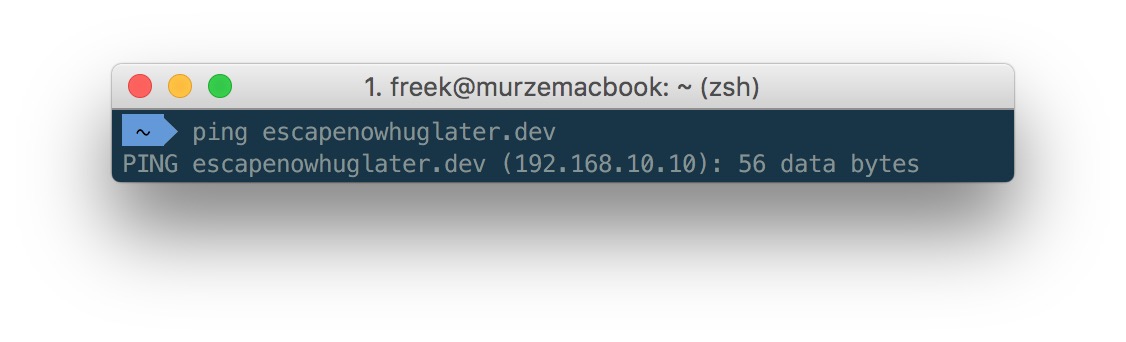
Screen Shot 2016-01-13 at 21.24.30 With dnsmasq up and running you can .dev domains can be used in the homestead yaml file:

sites
    - map: spatie.dev #no need to put this url in your hosts file
      to: /home/vagrant/sites/spatie.be/public

Use a bash function to work with a globally installed homestead

You can opt to use a seperate homestead box for every project. I personally prefer one homestead box for all projects. In the Laravel 4.2 days the Laravel documentation covered a PHP tool to easily work with a homestead box. This section has been removed in the 5.X documentation, so I assume that development of the tool has been stopped. Fortunately all functionality that the PHP tool provided can be performed by this small bash function:
function vm() {
   cd ~/homestead
   
   command="$1"

   if [ "$command" = "edit" ]; then
      open ~/.homestead/homestead.yaml
   else
      if [ -z "$command" ]; then 
         command="ssh"
      fi
   
      eval "vagrant ${command}"
   fi

   #switch back to directory where command was performed in
   cd -
}

When this function is loaded these commands can be executed from every directory.

  • `vm up`: start the homestead machine
  • `vm halt`: stop the homestead machine
  • `vm`: ssh into the homestead machine
  • `vm edit`: edit the yaml file in the default text editor
  • `vm provision`: provision the homestead machine

Map your dotfiles directory

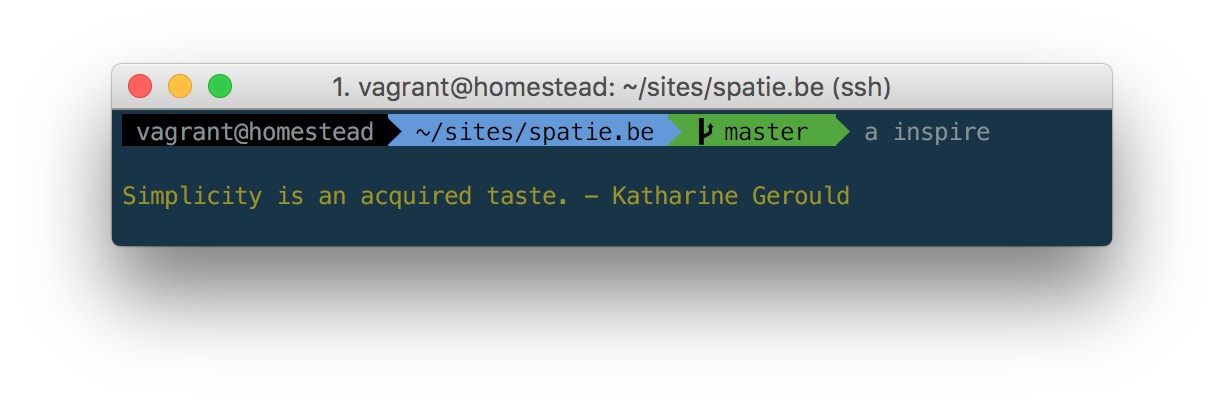
Terminal users often save their most used functions, aliases and general configuration in a dotfiles repository. This dotfiles-directory is generally cloned in the home folder on a development machine. When that directory is mapped to homestead as well the custom functions and aliases can be used from inside homestead.
folders
    - map: ~/.dotfiles
      to: /home/vagrant/.dotfiles

Syncing the folder is not enough. The steps you need to perform to load the dotfiles on the host machine should be executed in homestead as well. In case of my dotfiles, the minimum that should be done is symlinking the .zshrc-file

ln -s $HOME/.dotfiles/shell/.zshrc $HOME/.zshrc

This is the result when using my dotfiles: [caption id="attachment_1937" align="alignnone" width="1224"]My custom zsh promt is visible inside homestead. The "a"-alias (short for "php artisan" is working) My custom zsh promt is visible inside homestead. The "a"-alias (short for "php artisan" is working)[/caption]
Do you have some homestead tips to share? Let me know in the comments below.

Read more

Fake the PHP version when running Composer

Mr. Composer, Jordi Boggiano, has posted an overview of composer features that have become available in the past year. A very nice one is config.platform.

The `config.platform` option lets you emulate which platform packages you have available on your prod environment. That way even if you have a more recent PHP version or are missing an extension locally for example, composer will always resolve packages assuming that you have the packages you declared installed.
That'll come in handy when you have a local php 7 environment and an older version installed on the server.

Read more