Posts tagged with phpstorm

Improving the performance of PhpStorm

PhpStorm is a fantastic editor. Unfortunately it can be quite slow. Brent, one of our developers at Spatie, blogged a few tips to make it run a bit faster. I've followed all his suggestions and PhpStorm now feels a bit more responsive.

I didn't start this post by writing my own thoughts, because I figured people were looking for some quick tips to speed of their IDE. As a PHP developer, I think that PhpStorm is such a powerful tool, which helps me to write good and maintainable code. I don't want it to stand in my way though, so good performance is an absolute requirement.

https://www.stitcher.io/blog/phpstorm-performance

Hopefully future versions of PhpStorm will be more performant out of the box.

Read more

Formatting Vue component properties in PHPStorm

Most of work is done in PHPStorm. On my current project I do a lot of Vue stuff. Regularly use PHPStorm auto format feature to make the code look nice. One thing that was bothering is that by default it will use 8 characters of indentation for Vue component properties. So you get this horrible code:

<br /><template>
    <!-- ? -->
    <my-component
            myProp="myValue"
            anotherProp="anotherValue"
    ></my-component>
</template>

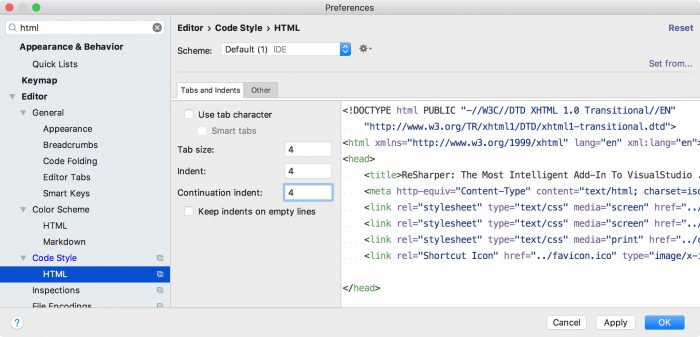
Today a golden tip by Christopher Pitt helped me find the solution. In the preferences of PHPStorm you need to set continuation indent of the html to 4 characters.

And after that the PHPStorm will reformat the code right according to our guidelines for Vue templates.

<template>
    <!-- ? -->
    <my-component
        myProp="myValue"
        anotherProp="anotherValue"
    ></my-component>
</template>

Read more

Join thousands of developers

Every two weeks, I share practical tips, tutorials, and behind-the-scenes insights from maintaining 300+ open source packages.

No spam. Unsubscribe anytime. You can also follow me on X.

Working With PHPUnit and PhpStorm

On the JetBrains blog Gary Hockin explains how to easily run a single PHPUnit test.

To run all the tests in a single file, right-click the test in the Project Pane (the left-hand navigation pane), and select Run .

To run all the tests in a single class, right-click the class name in the editor, and select Run .

To run the tests in a single method, right-click the method name, and select Run .

https://blog.jetbrains.com/phpstorm/2017/01/working-with-phpunit-and-phpstorm/

Read more

A collection of PHPStorm tips

Nikush Patel created an awesome little site where he shares PHPStorm tips. Every tip is demonstrated by an animated gif.

I'm a big fan of PhpStorm and an equally big fan of keyboard shortcuts and optimised workflows, so I wanted to share all the best tips and tricks I know to help everyone else make the most of PhpStorm as well!

I produce useful tips in bite-sized gif recordings so they are easier to consume than reading the docs.

http://phpstorm.tips/

Read more

No Time for a Taxicab

Gary Hockin posted a video with his attempt in solving the Day 1 challenge of http://adventofcode.com/. The video not only shows how he solved the problem codewise but also demonstrates some nice features of PHPStorm.

Mistakes and all, I attempt to code day 1 part 1 of the Advent of Code challenges you can find at http://adventofcode.com.

I deliberately didn't overly edit, or over complicate the video as I'm trying to get them done as fast as possible, if you like this I'll do some more!

I know some people will say "Waaa you should have done it like this!", or "Why didn't you use library $x", well I didn't so get over it. I'm also worried this gives away far too much about my coding quality and how lazy I am, but such is life.

Read more

How to refactor code with PhpStorm

Matthew Setter demonstrates PhpStorm's handy refactorings. Personally I use "extracting code to a new method" quite a lot.

Refactoring covers a range of different techniques, including moving, extracting, copying, deleting, and renaming. These cover all the types of changes which you are likely to make to your code on an ongoing basis.

Gladly, PhpStorm’s refactoring functionality, which is included as part of the core package, has support for all of these. In this tutorial, I’m going to step through a couple of them; specifically:

  • Extracting code to a new method
  • Renaming a function
  • Changing a function's signature

https://www.matthewsetter.com/refactoring-code-with-phpstorm/

Read more

A beautiful PHPStorm theme

PHPStorm is the application I'm working in most of the time. So I want it to be as pretty as it can be. Right out the box PHPStorm contains two bat shit ugly themes: the default white one and the slightly better Darcula.

Fortunately for all PHPStorm users out there long time Laravel community member Dayle Rees showed us the way to the light! A few years ago he created an abundance of colour schemes that are a pleasure to the eye. You can view all the schemes on the demo page.

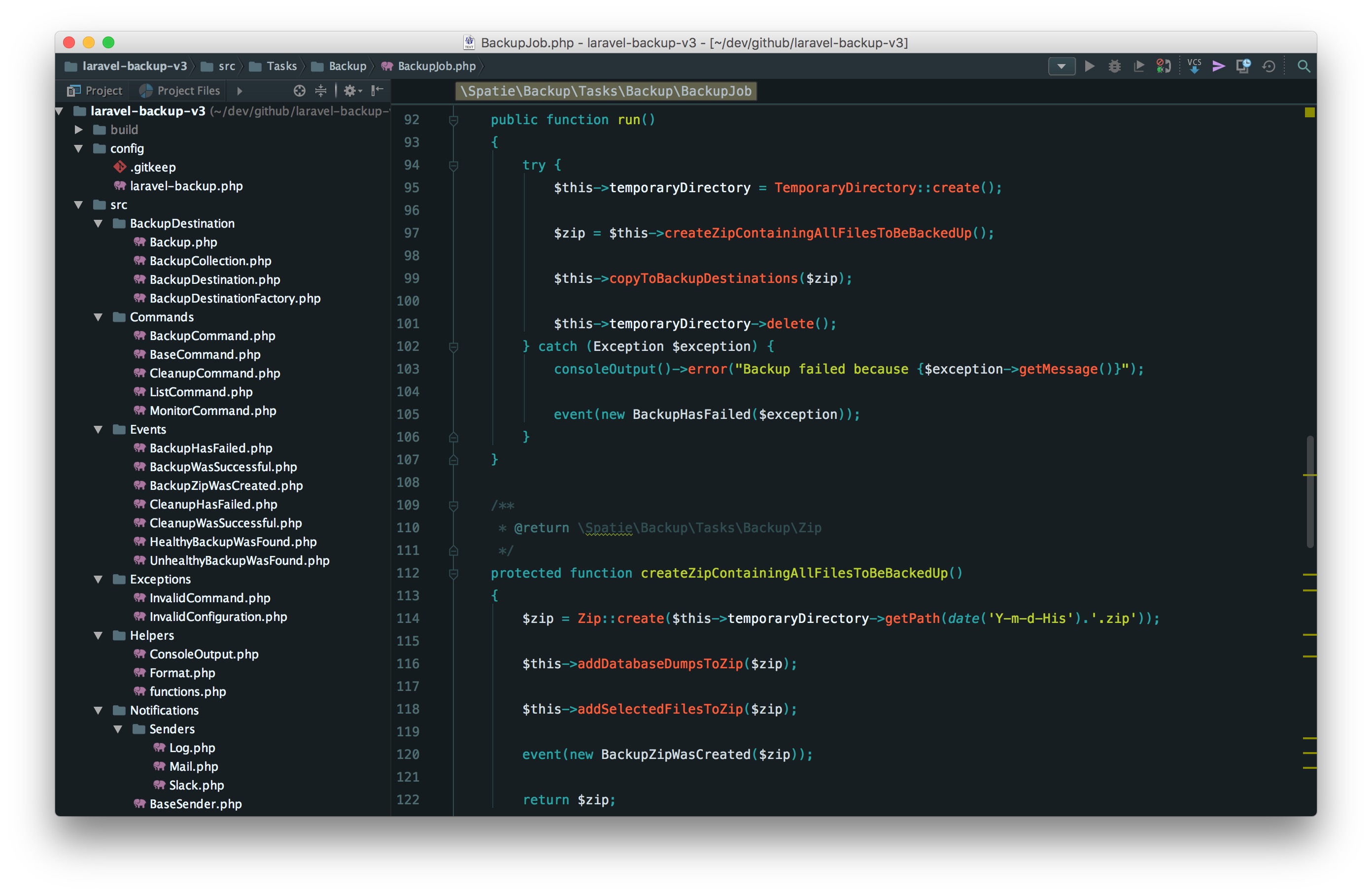
More recently Dayle created a new colour scheme called Material Peacock. This is what it looks like:

material

Very nice! Almost everywhere I open up PHPStorm people ask what that theme is, so I'm certainly not the only one who digs it. At this year's PHP UK Conference a PHPStorm-engineer from Jetbrains said it was the most beautiful theme he ever saw in his own product.

You find instructions on how to install the theme (made by Chris Magnussen) and the colour scheme in Dayle's Material Peacock repo on GitHub.

Read more

Enabling autocompletion for dynamic return types in PhpStorm

If you're using PhpStorm you probably make heavy use of it's autocomplete features. The IDE can, for most classes, suggests all accessible functions. Unfortunately, when a function has a dynamic return type PHPStorm will leave you out in the cold. So when resolving something out of Laravel's IoC-container PhpStorm cannot help you. Here's an example with one of the repositories of Blender:

Screen Shot 2015-12-04 at 20.42.42

PhpStorm can't suggest functions because it doesn't know which class the make-function will return. Let's fix that.

The DynamicReturnType plugin provides a way to dynamically specify the return type of a function. You can install it like every other PHPStorm plugin. Next you'll have to create a file called dynamicReturnTypeMeta.json in the root of your project with this contents:

{
    "methodCalls": [
        {
            "class": "\\Illuminate\\Contracts\\Foundation\\Application",
            "method": "make",
            "position": 0
        }
    ]
}
```

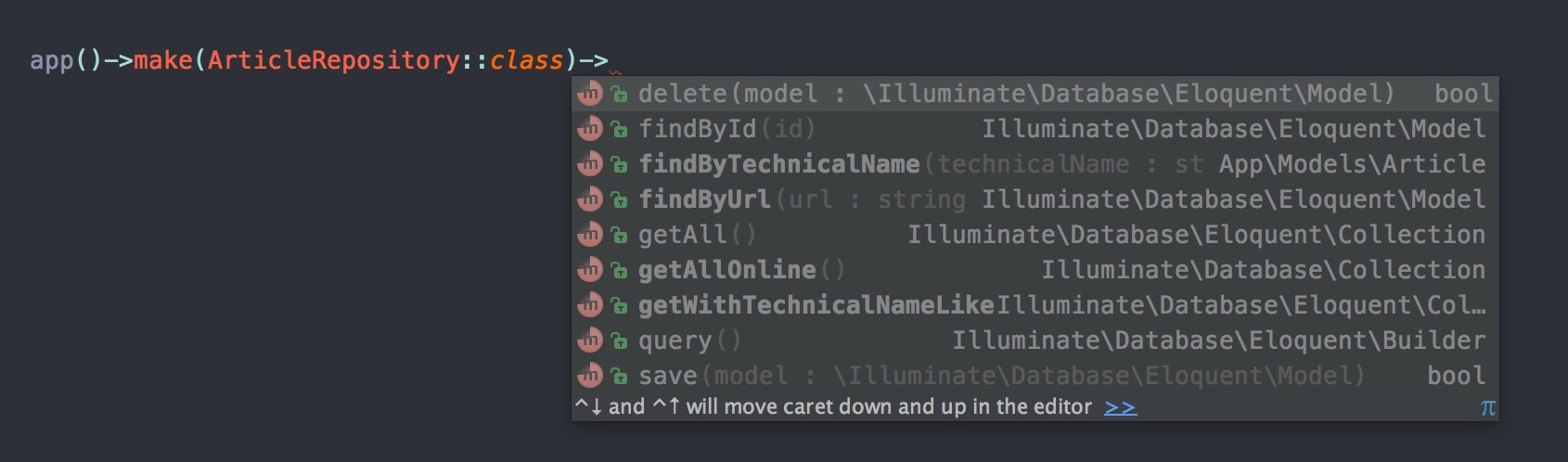
This configuration will tell PHPStorm that the return type of the make-function of Illuminate\Contracts\Foundation\Application will return an instance of class specified in the first argument.

With this file in place PHPStorm can perform autocompleting:
Screen Shot 2015-12-04 at 20.34.59

To learn all other possibilities the plugin offers, read it's documentation on GitHub.

Update: As Nicolas Widart mentions in the comments below there's another (and maybe easier way) to get autocompletion when resolving stuff from Laravel's IoC-container. The ide-helper package can generate a meta file that, when indexed, will make PhpStorm understand which object gets returned.

Read more