In this post, Jean Yang focusses on why we don’t see more high-growth startups focused on the kinds of languages and tools coming out of the PLDI community, the “deep tech” side of programming tools.
Get my monthly newsletter with what I learn from running Spatie, building Oh Dear, and maintaining 300+ open source packages. Practical takes on Laravel, PHP, and AI that you can actually use.
No spam. Unsubscribe anytime.
You can also follow me on X.
"Freek’s newsletter is one of the best ways to stay updated with the Laravel and PHP ecosystem. It consistently highlights useful packages, tools, and ideas from the community, especially the amazing work coming from Spatie. As a Laravel developer building SaaS and web platforms, I find it extremely helpful to discover practical tools and insights that improve my development workflow."
I do want to point out that print debugging has one critical feature that most step-based debuggers don't have: you can see program state from multiple time steps all at once.
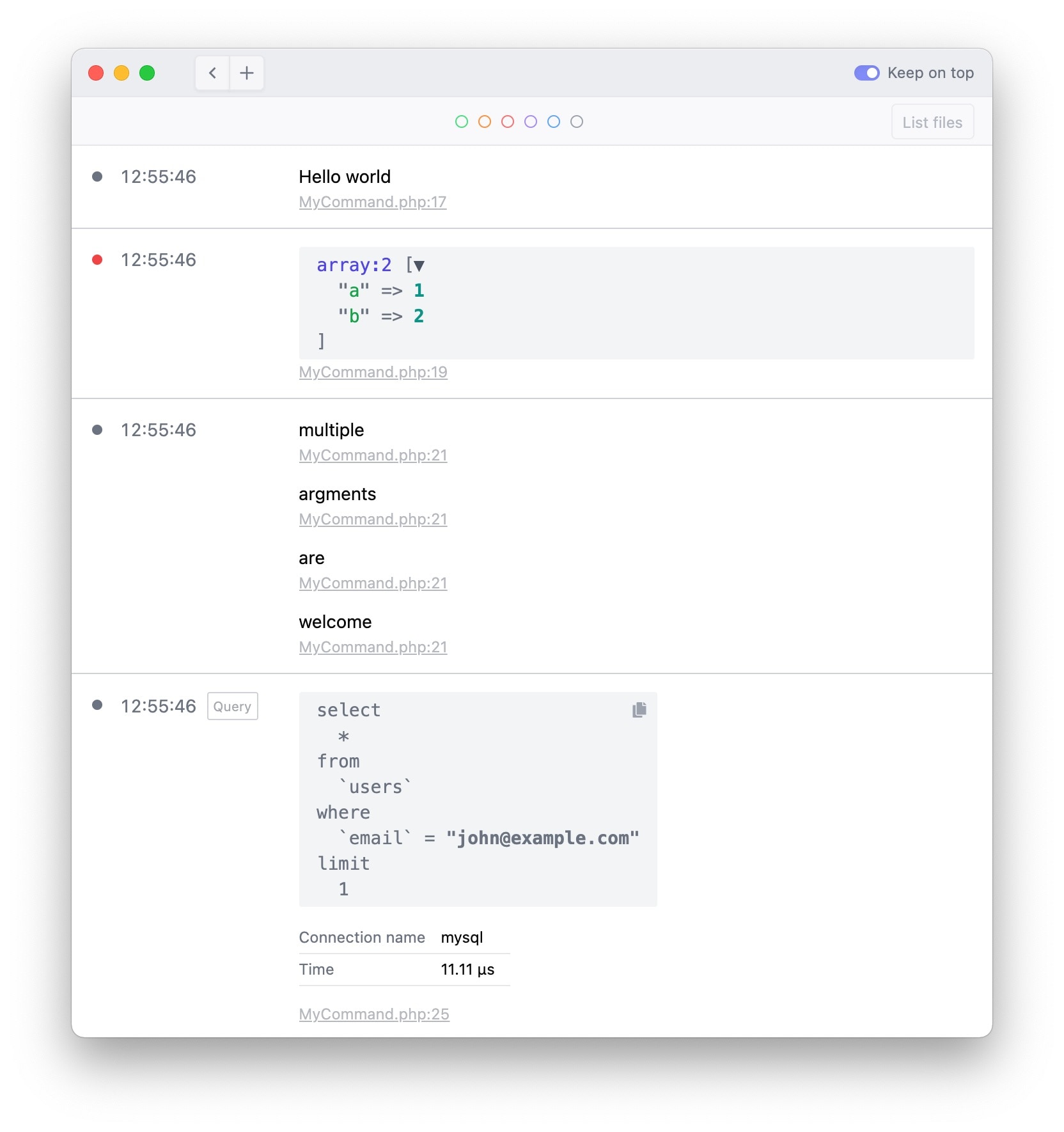
Earlier this year, we released Ray, a desktop app that allows you to debug faster. Instead of dumping values to the browser or console, Ray allows you to display debugging information beautifully in a dedicated window.
Since launch, Ray helps you debug local projects. Today, we're adding the most requested feature to Ray: the ability to connect to remote servers. All output of the ray() call, will be sent securely from your remote server to the local app via SSH.
Using this feature, you can quickly investigate problems on your production servers that you are unable to recreate locally.
I'm proud to announce the immediate release of Ray, a desktop app that vastly improves your debugging experience. Ray is a dedicated window to send dumped values to. It has a lot of features that help you find and fix bugs faster.
Ray is available for macOS, Windows and Linux.
In this blog post, I'd like to share why and how we've built Ray. If you just want to know what Ray is, head to the Ray homepage.
After tweeting out a screenshot, it often get questions around which editor, font or color scheme I'm using. Instead of replying to those questions individually I've decided to just write down the settings and apps that I'm using.
This article is the result of my 8 years of experience with PhpStorm and my best settings that make you a faster developer and let you focus more on the important things.
After tweeting out a screenshot, it often get questions around which editor, font or color scheme I'm using. Instead of replying to those questions individually I've decided to just write down the settings and apps that I'm using.
Liam Hammett explains how you can use the trap command to stop multiple bash process in one go.
Sometimes when working on a project, I’ll always want to run a handful of commands at the same time, some of which may return when they’re done, others might be long-running, like watchers or services actively exposing ports. This is something that might seem simple to do with a basic Bash script at first, but what if your script has multiple processes running side-by-side and you want to be able to stop them all at once too?
In the first blogpost on his new blog, Mathias Hansen, co-creator of geocod.io, walks us through how he customized the look of macOS. ChunkWM seems particularly interesting.
ChunkWM neatly arranges all of the windows on my screen. skhd which me to define global hotkeys to control ChunkWM. Pecan (built on Übersicht) renders the neat status bar that you see at the top of the screen
Lorna Jane gives a good overview of the tools available when working on an API.
As Web Developers, we need to know how to work with HTTP from every angle. I gave a 2-hour tutorial at PHP UK that included some of my most trusted tools - but it was sold out and a bunch of people asked me if there was video (there wasn't, tutorials make little sense when videoed). Instead, I thought I'd try to set out a self-study version of the workshop (I rarely teach these days so I'm unlikely to deliver it anywhere else).