Exploring the browser rendering process
Here's everything what a browser does to display the content of an URL.
Read more [abhisaha.com]
Posts tagged with browser
Here's everything what a browser does to display the content of an URL.
Read more [abhisaha.com]
Let’s review their similarities and differences, and determine when to use which.
Read more [sebastiandedeyne.com]
Join 9,500+ smart developers
Every month I share what I learn from running Spatie, building Oh Dear, and maintaining 300+ open source packages. Practical takes on Laravel, PHP, and AI that you can actually use.
No spam. Unsubscribe anytime. You can also follow me on X.
Here's a nice list of JS niceties that is available natively in modern browsers
Read more [turriate.com]
Earlier this year, Apple announced that it limit the lifetime of trusted certificates to 398 days. Shortly after, both Firefox and Chrome followed in their footsteps.
Read more [ohdear.app]
A nice explanation of the window.crypto functions that are available in all major browsers.
Read more [blog.excalidraw.com]
Via the excellent bram.us blog I stumbled on this neat colletion of Reacht hooks.
Read more [www.bram.us]
Mariko Kosaka, an engineer at Google, started a beautifully illustrated series on how Chrome works behind the scenes.
In this 4-part blog series, we’ll look inside the Chrome browser from high-level architecture to the specifics of the rendering pipeline. If you ever wondered how the browser turns your code into a functional website, or you are unsure why a specific technique is suggested for performance improvements, this series is for you.
Read more [developers.google.com]
A couple of weeks ago GitHub removed the last usages of jQuery in their front end code. On their engineering blog that share why and how they removed it.
We have recently completed a milestone where we were able to drop jQuery as a dependency of the frontend code for GitHub.com. This marks the end of a gradual, years-long transition of increasingly decoupling from jQuery until we were able to completely remove the library. In this post, we will explain a bit of history of how we started depending on jQuery in the first place, how we realized when it was no longer needed, and point out that—instead of replacing it with another library or framework—we were able to achieve everything that we needed using standard browser APIs.
Read more [githubengineering.com]
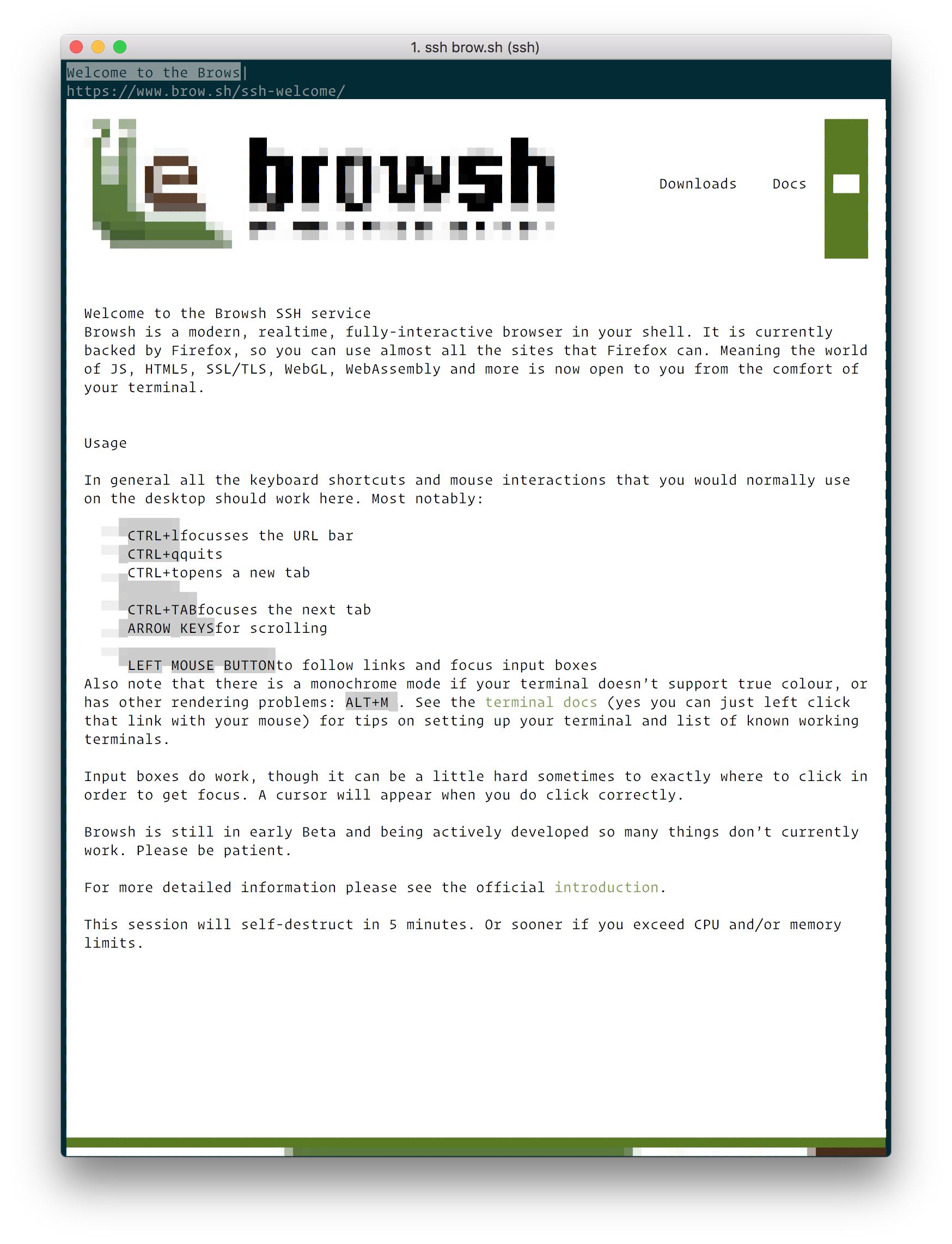
Browsh is a small browser that you can run inside your terminal. If you don't want to install it locally, you can test is out by ssh'ing to it.
ssh brow.sh
Here's a screenshot of the https://www.brow.sh/ running in Browsh.

How cool is that! I don't see myself using this as my main browser soon, but it sure is a pretty cool project. It goes without saying that you should not type any sensitive data while using it via ssh.
In a terrific talk given at JS.Conf Asia, Jake Archibald, developer advocate at Google, explains what's going on in the event loop of the browser.
The HTTP specification says that status codes should be three digits integers, but what happens if they are not? April King, head of website security at Mozilla, did some fun experiments to find out.
While it is easy to create test cases for conditions that don't satisfy this requirement, it is somewhat more difficult to determine how third-party libraries will handle HTTP requests that fall outside this constraint. I looked around the internet for websites to help me test weird status codes, but most of them only let me test with the known status codes. As such, I decided to add arbitrary HTTP status codes to my naughty httpbin fork, called misbehaving.site.What I discovered is that the various browser manufacturers have wildly different behavior with how they handle unknown HTTP status codes.
Peter O'Shaughnessy, a developer advocate for Samsung, explains that your idea on which browsers are the most popular is probably wrong.
Our traditional idea of the top five browsers may be over-simplified, outdated and skewed.Chrome, Firefox, Safari, IE/Edge, Opera… It is a common idea that these are the five “major browsers”. Our familiarity with them is comforting, but it might be a skewed and outdated view. Partly from our Western bubble and partly a hangover from the days of desktop dominance. Let’s take a look at some numbers so we can better represent the reality.
https://medium.com/samsung-internet-dev/think-you-know-the-top-web-browsers-458a0a070175
David Gilbertson tells you all about polyfills.
Faced with the reality that you can’t write modern code and expect it to work for all users, you have exactly two choices:
- Only use language features available in all the browsers you support
- Write modern code, then do something to make it work in older browsers
If you have decided on option one then I respectfully suggest that you are bonkers, and insist that you state your case in the comments. I believe that developers who are able to explore all the new stuff and use it in their day-to-day jobs stay happy, and being happy is important.
https://hackernoon.com/polyfills-everything-you-ever-wanted-to-know-or-maybe-a-bit-less-7c8de164e423
If you have a form on your website where one of the fields is of the `type="password"`, the page will now be marked as insecure in your browser if it is served over a plain HTTP connection.https://ma.ttias.be/firefox-nightly-starts-marking-login-forms-in-http-as-insecure/
In this video Tom Scott explains why Chrome couldn't handle http://a/%%30%30 :
https://www.youtube.com/watch?v=0fw5Cyh21TE
Instant access to all desktop and mobile browsers. Say goodbye to your setup of virtual machines and devices.browserstack.com
If Paul Irish likes it, it's probably good.