Oh Dear is the all-in-one monitoring tool for your entire website. We monitor uptime, SSL certificates, broken links, scheduled tasks and more. You'll get a notifications for us when something's wrong. All that paired with a developer friendly API and kick-ass documentation. O, and you'll also be able to create a public status page under a minute. Start monitoring using our free trial now.

Identify the software used on sites you visit

Link –

Every webdeveloper has probably at some point wondered which technologies a particular site is using. Sure, you could browse the source of a page to find any hints on for instance what cms is being used. Or you could inspect the response headers to see what version of php is used.

Instead of hunting down those clues yourself, you could use the Wappalyzer plugin. Once installed it shows an extra icon in your browser. It indicates what sort of framework or cms is used. Clicking on the icon reveals even more info such as which JavaScript libraries are embedded on the site. It's a great tool.
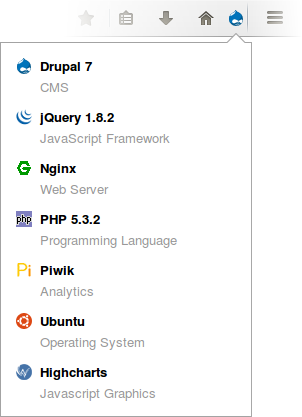
installed_firefox

Share Post LinkedIn

I write about Laravel, PHP, AI and building better software.

Every two weeks, I share practical tips, tutorials, and behind-the-scenes insights from maintaining 300+ open source packages. Join thousands of developers who read along.

No spam. Unsubscribe anytime. You can also follow me on X.

Found something interesting to share?

The community section is a place where developers share links to articles, tutorials and videos. Submit a link and help fellow developers discover great content. As a thank you, you'll receive a coupon for a discount on Spatie products.