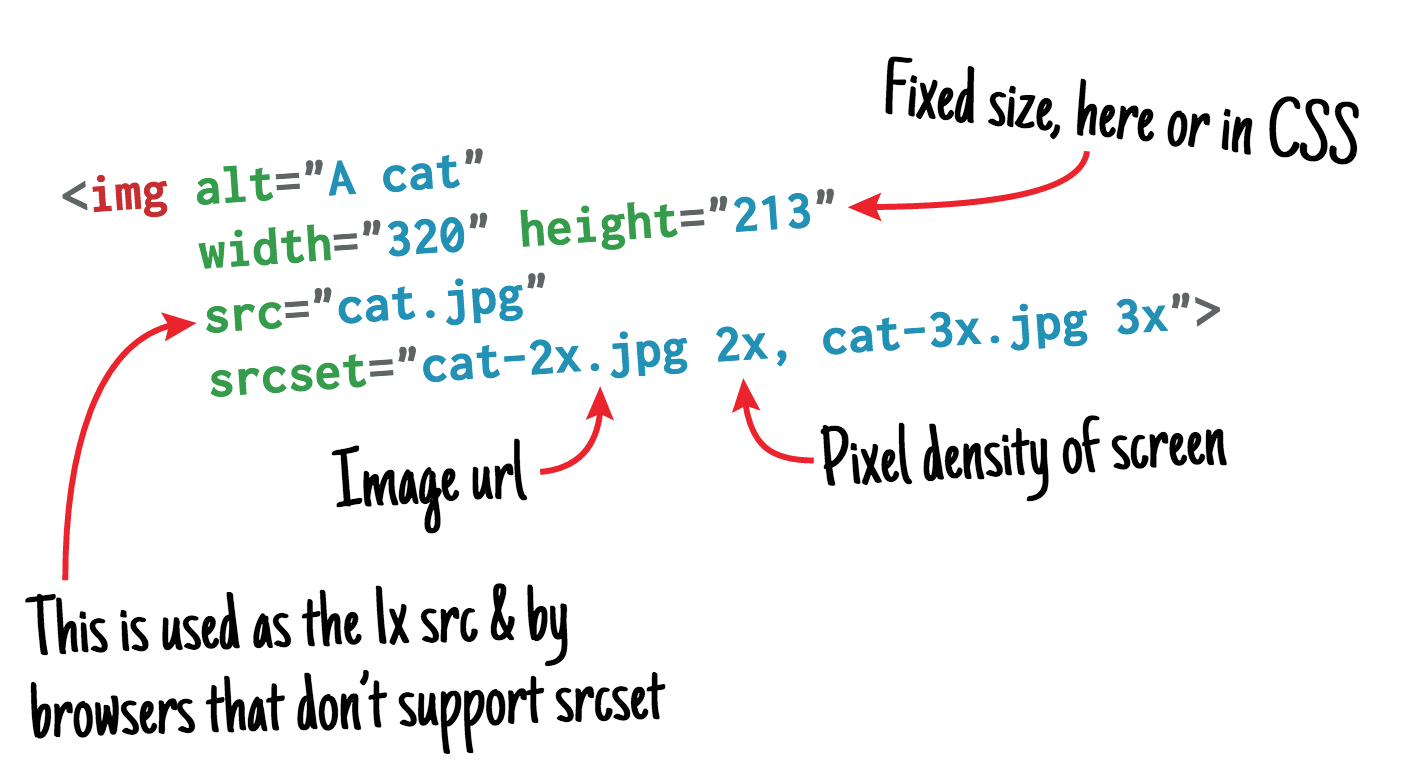
The anatomy of responsive images
Jake Archibald, a developer advocate for Google Chrome, wrote an excellent article on how modern browsers can handle responsive images.
https://jakearchibald.com/2015/anatomy-of-responsive-images/
Posts tagged with performance
Jake Archibald, a developer advocate for Google Chrome, wrote an excellent article on how modern browsers can handle responsive images.
https://jakearchibald.com/2015/anatomy-of-responsive-images/
A typical request on an dynamic PHP site can do a lot of things. It's highly likely that a bunch database queries are performed. On complex pages executing those queries and hydrating them can slow a site down.
The response time can be improved by caching the entire response. The idea is that when a user visits a certain page the app stores the rendered page. When a second request to the page is made, the app shouldn't bother with rendering the page from scratch but just serve the saved response.
I've made a Laravel package named "laravel-responsecache" that does just that. Installing it is very easy: just add the service provider and facade to the app's configuration. And step two is... there is no step two. In most cases you're done. All successful responses (that is a response with a statuscode in the 200 or 300 range) to a GET-requests will now be cached for a week. If the response of a specific route or controller should never be cached middleware can be added that prevents caching. Furthermore each logged in user will have have it's own separate cache. Cached responses can be stored in any configured repository in Laravel. You could easily share a cache between servers by using memcached.
I think that behaviour will suit a lot of use cases. If you need some other caching behaviour (eg. cache error responses, exempting redirects, using a common cache for users with the same role, changing the expiration time of the cache) you can easily write a custom caching profile.
The package isn't supposed to sweep performance troubles under the rug. All apps should be optimized so that they'll respond in an acceptable timeframe without using response caching. My rule of thumb is that typical pages in a cms should be able to render within a second (and preferably much less). Anything above that is unacceptable. That number is by no means scientific. Make up your own mind what an acceptable responsetime should be. Of course all of this depends on the type of site and the amount of visitors it has to handle. Also keep in mind that that there are a lot of other aspects that need to be considered when trying to deliver a speedy experience.
There are some great alternatives to cache responses. Two well known solutions are Varnish and Nginx caching. They take response caching one step further by not even invoking php when serving a cached request. Both options are very robust and can work on any scale. The benefits the Laravel package has over Varnish-like solutions is that it is easier to set up and that application logic can be used to determine what needs to be cached.
If you're interested in speeding up your Laravel app using the package, go take a look at it on GitHub:
Join 9,500+ smart developers
Get my monthly newsletter with what I learn from running Spatie, building Oh Dear, and maintaining 300+ open source packages. Practical takes on Laravel, PHP, and AI that you can actually use.
No spam. Unsubscribe anytime. You can also follow me on X.
"Freek’s newsletter is one of the best ways to stay updated with the Laravel and PHP ecosystem. It consistently highlights useful packages, tools, and ideas from the community, especially the amazing work coming from Spatie. As a Laravel developer building SaaS and web platforms, I find it extremely helpful to discover practical tools and insights that improve my development workflow."
HTTP2 will mean a change in how we should build websites. The best practices of HTTP1 are harmful in a HTTP2 world.https://mattwilcox.net/web-development/http2-for-front-end-web-developers
Michael Maclean demonstrates how a 2100% performance gain can be achieved when rendering a Mandelbrot fractal using Recki-CT, a PHP compiler written in PHP.
Recently, Anthony Ferrara (known throughout the Internet and beyond as @ircmaxell) and Joe Watkins (similarly well-known as @krakjoe) have been working on a new set of toys for solving this problem while staying on the “standard” PHP runtime. Recki-CT is a set of tools that implement a PHP compiler, in PHP. While this might you think of things like PyPy, which implements a Python virtual machine in Python, this is not Recki’s goal – it doesn’t provide a VM, so it can’t run PHP by itself. However, it can parse PHP code and generate other code from it.http://mgdm.net/weblog/php-at-the-speed-of-c/
This chart shows the number of requests per second that were performed (more is better). You can see that PHP 7 can do a lot more in comparison with the other versions. Response times drop from 0.2269 to 0.0865 seconds in the production environment.http://www.intracto.com/nl/blog/running-symfony2-on-php7
Nice benchmark-work by Tom Van Looy. It is clear that you'll benefit from impressive speed bumps when upgrading to the next major version of PHP. Tom also provides instructions on how to setup PHP7 so you can perform your own tests.
This is a "living document" in the sense that I keep posting updates, and I care about and value feedback, questions and comments I get about it. This document improves over time thanks to a joint effort.http://daniel.haxx.se/http2/
The DOM and all additional resources don't need to be parsed, the client can already begin the download of the `screen.css` resource, without "wasting time" processing the DOM and all external resources, only to make a new request to the server to begin fetching them.http://ma.ttias.be/service-side-push-http2-nghttp2/When you add this all up for all resources on a page, this can easily save 100-200ms of the total page load/paint of a website. Those are numbers that should really have you consider implementing HTTP/2.
Chrome has supported SPDY since Chrome 6, but since most of the benefits are present in HTTP/2, it’s time to say goodbye. We plan to remove support for SPDY in early 2016, and to also remove support for the TLS extension named NPN in favor of ALPN in Chrome at the same time. Server developers are strongly encouraged to move to HTTP/2 and ALPN.http://blog.chromium.org/2015/02/hello-http2-goodbye-spdy-http-is_9.html
An old, but still relevant, blogpost by Derick Rethans (of Xdebug fame) about why the @-operator should be avoided.
http://derickrethans.nl/five-reasons-why-the-shutop-operator-should-be-avoided.html
Zend Framework 3 will be an evolution from ZF2, concentrating on simplicity, reusability, and performance.http://framework.zend.com/blog/announcing-the-zend-framework-3-roadmap.html
Optimizing for PHP7, and supporting PHP 5.5 seems like a good idea.
An overview of the hard- and software used by the StackExchange network to render 560 million pages views per month.
The arrival of HTTP/2 will require a bit of re-thinking how we handle websites (and webservers), so perhaps it's time to reflect on what those changes can bring. This post is based entirely on theory (the HTTP2 spec), as HTTP/2 is hard to test today (with a lack of servers and browser support).https://ma.ttias.be/architecting-websites-http2-era/
Patrick Dubroy explains how you can track down client-side performance problems using the Chrome Dev Tools.
http://vimeo.com/77322983
Backblaze is transitioning from using 4 TB hard drives to 6 TB hard drives in the Storage Pods we will be deploying over the coming months. With over 10,000 hard drives needing to be purchased over the next several months, the choice of which 6TB hard drive to use is critical.https://www.backblaze.com/blog/6-tb-hard-drive-face-off/
Backblaze needs to store 130 TB of incoming customer data every day.
Nginx Server Configs is a collection of configuration snippets that can help your server improve the web site's performance and security, while also ensuring that resources are served with the correct content-type and are accessible, if needed, even cross-domain.https://github.com/h5bp/server-configs-nginx
Compare load times of the unsecure HTTP and encrypted HTTPS versions of this page.https://www.httpvshttps.com/
If you've been following the news, you'll have noticed that yesterday Composer got a bit of a speed boost. And by "bit of a speed boost", we're talking between 50% and 90% reduction in runtime depending on the complexity of the dependencies. But how did the fix work? And should you make the same sort of change to your projects? For those of you who want the TL/DR answer: the answer is no you shouldn't.http://blog.ircmaxell.com/2014/12/what-about-garbage.html
When creating a new website you should always use HTTPS. Here's a video recorded at Google I/O earlier this year on the why and how.
The New York Times switched to HTTPS last month. Here are their reasons for doing so:
Perfmap consists of a bookmarklet and Chrome extension to create a front-end performance heatmap of resources loaded in the browser using the Resource Timing API.