Adding a subscription form to the web views of Mailcoach original
After sending a new edition of my newsletter, I usually tweet out a webview URL together with a URL where people can subscribe to the newsletter. A webview is a hard to guess URL that people who didn't subscribe can visit to read the content of the newsletter.
Here’s the newsletter I sent earlier this week! https://t.co/NLENk7wuvc
— Freek Van der Herten (@freekmurze) January 12, 2020
Subjects this time: GitHub actions, Vue 3.0, PHP performance and much more!
Subscribe here to get the next edition in your mailbox: https://t.co/Eu5GJU9fbu#php #laravel #js
Until last week, the webview URL just displayed the content of the sent campaign. Recently, I added a subscription form to that webpage, so people don't need to go to a separate page to subscribe. Here's how that looks like:
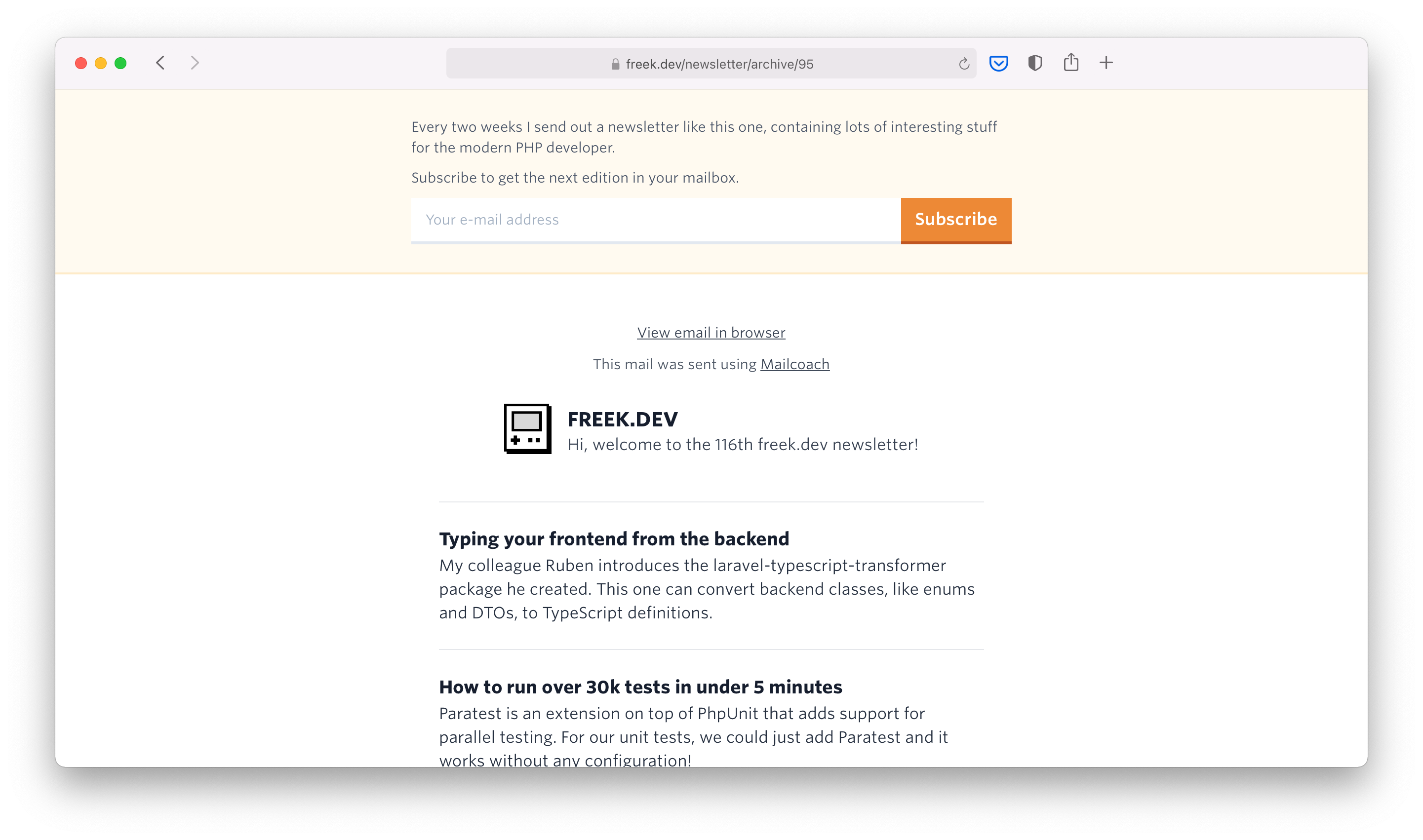
In this blog post, I'd like to share how that subscription form was added.
Customizing the webview
It probably comes as no surprise that I use our homegrown Mailcoach package to sent out my newsletter. Whenever a campaign (that's Mailcoach speak for newsletter) is sent, Mailcoach makes the campaign available as webview.
You can get to the URL of the webview of a campaign:
$campaign->webViewUrl();
Up until last week, I just used the webViewUrl in the Blade view that displays all past campaigns
@foreach($pastCampaigns as $campaign)
    <div>
        <a href="{{ $campaign->webViewUrl() }}">{{ $campaign->subject }}</a>
        <div class="text-gray-700 text-xs">sent on {{ $campaign->sent_at->format('jS F Y') }}</div>
    </div>
@endforeach
The first thing I did was create a route newsletter.show of my own to take control of which view is rendered when people see an archived newsletter.
@foreach($pastCampaigns as $campaign)
    <div>
        <a href="{{ route('newsletter.show', $campaign->id) }}">{{ $campaign->subject }}</a>
        <div class="text-gray-700 text-xs">sent on {{ $campaign->sent_at->format('jS F Y') }}</div>
    </div>
@endforeach
The controller that gets called to serve the newsletter.show route, returns the newsletter.blade.php view.
From using an iframe...
This was my first naive approach to display a form above the webview. The HTML page just started with a subscription form, followed by an iframe that displays that webview URL. I used an iframe to prevent the CSS from the main site to bleed through in the campaign HTML.
<html>
    <head>
        <style>{!! file_get_contents(public_path('css/app.css')) !!}</style>
        <link rel="stylesheet" href="https://cloud.typography.com/6194432/6581412/css/fonts.css"/>
        <title>{{ $campaign->subject }}</title>
    </head>
    <body>
        <header class="w-full mb-4 p-4 sm:p-6 md:px-8 md:py-7 bg-orange-100 border-b-2 border-orange-200 text-xs text-gray-700">
            <div class="max-w-lg mx-auto space-y-2">
                <p>
                    Every two weeks I send out a newsletter like this one, containing lots of interesting stuff for the modern
                    PHP
                    developer.
                </p>
                <p>
                    Subscribe to get the next edition in your mailbox.
                </p>
                @include('front.newsletter.partials.form')
            </div>
        </header>

        <iframe href="{{ $campaign->webViewUrl() }}" />
    </body>
</html>
This would get me 95% of the way there. A challenging problem that I couldn't solve entirely on my own was the janky scroll behavior caused by having an iframe on the page.
Here an example of that "janky" feel:
... to using a web component
Luckily my colleague Seb had an excellent solution: web components. You can think of a web component as a custom HTML tag in which a separate DOM, called the shadow DOM, is rendered. This shadow DOM does not get the CSS of the main page applied to it.
Here's that view that display a subscription form + newsletter again, but this time a web component is used. A bit of JavaScript is needed at the top to configure the web component. The $webview contains the full page content returned by $campaign->webViewUrl().
<html>
    <head>
        <style>{!! file_get_contents(public_path('css/app.css')) !!}</style>
        <link rel="stylesheet" href="https://cloud.typography.com/6194432/6581412/css/fonts.css"/>
        <title>{{ $campaign->subject }}</title>
        <script>
            window.customElements.define('campaign-webview', class NewsletterEmbed extends HTMLElement {
                connectedCallback() {
                    const shadow = this.attachShadow({ mode: 'closed' });
                    shadow.innerHTML = this.getAttribute('contents');
                }
            })
        </script>
    </head>
    <body>
        <header class="w-full mb-4 p-4 sm:p-6 md:px-8 md:py-7 bg-orange-100 border-b-2 border-orange-200 text-xs text-gray-700">
            <div class="max-w-lg mx-auto space-y-2">
                <p>
                    Every two weeks I send out a newsletter like this one, containing lots of interesting stuff for the modern
                    PHP
                    developer.
                </p>
                <p>
                    Subscribe to get the next edition in your mailbox.
                </p>
                @include('front.newsletter.partials.form')
            </div>
        </header>

        <campaign-webview contents="{{ $webview }}"></campaign-webview>
    </body>
</html>
This is pretty neat! It does exactly what we want: the main page's CSS doesn't bleed through, and there's no janky scroll behavior.
To know more about web components and the shadow DOM, read this excellent blog post by Seb.